59.3.9.7 Asset File Delete
Action Description
This template can create an action to delete a specific type of asset(s) in one or various devices. Once attached to assets, the Operations By Workflow (from Etere Ingest) would perform the asset deletion.
If the T-workflow action cannot delete assets for specific reasons, it will be recorded in the action log. Assets would not be deleted from the database under the following circumstances:
•The asset is part of the contract
•The asset is linked to other assets (e.g., the asset is archived on LTO tape or stored in a video server)
•The asset contains costs related to the tasks
•The asset is programmed in the historical database (e.g. the asset is featured in the archived on-air playlist)
•The asset has already been scheduled.
•The asset contains video and has not been set to delete the video
•The asset contains child assets forming part of a project.
NB: Upon completing the "Asset File Delete" action, the deleted assets were no longer visible on the monitoring console, and the workflow logs would also be deleted. For traceability, you can set the assets as "expired" and exclude those expired assets when searching for the rest of the assets in the Media Library.
Note:
There are default asset actions for requesting the automatic physical deletion of asset files on specific devices and codecs.
Action Parameters
The following parameters need to be compiled to create a new action:
Parameter: Name
Description: Give a name to the T-workflow action (e.g. "Delete WMA assets")
Parameter: Select the devices
Description: Select the meta device where the file to be deleted is stored.
Parameter: Select the codec
Description: If the meta device contains multiple versions (codecs) of the video file, select the codecs you wish to delete.
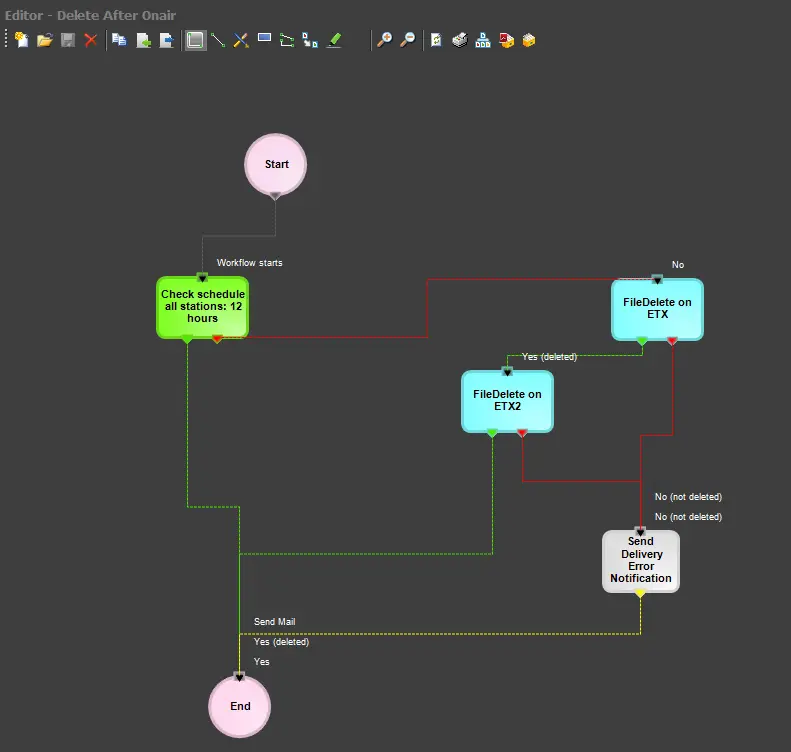
It is essential to know that FileDelete actions are automatically created for all meta devices (e.g., 'FileDelete on metadevice1', 'FileDelete on metadevice2', etc.); however, you can create custom actions of this type for performing a file deletion simultaneously amongst various meta devices and based on different codecs.
How to use it
Once a 'FileDelete' action is created, it requires to be inserted into a T-workflow to be attached to assets; this T-workflow can be, for example, a T-workflow for deleting all media files related to assets present in some playout servers (e.g. MTX1, OMNEON1 and MTX1) and which are not scheduled to send on-air shortly (e.g. next 24 hours):
workflow_actions_asset_file_delete
 filedelete