59.3.2.1 Conforming settings
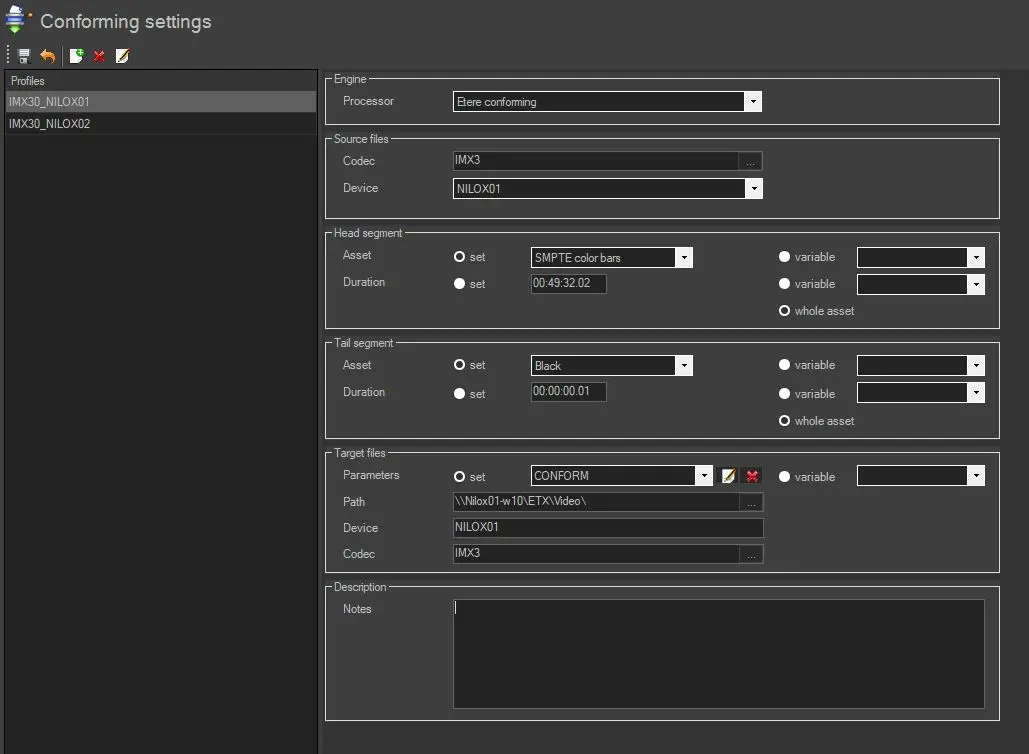
The Conforming Settings section allows defining custom profiles for various conforming operations (e.g. SD conforming, HD conforming, conforming with head and tail, etc.). Each profile will be composed of a set of parameters that will enable "conform version" actions to prepare the EDL to be used for conforming all required segments (i.e. video parts) of a certain asset.
All available parameters in this section are following explained:
Conforming_Settings
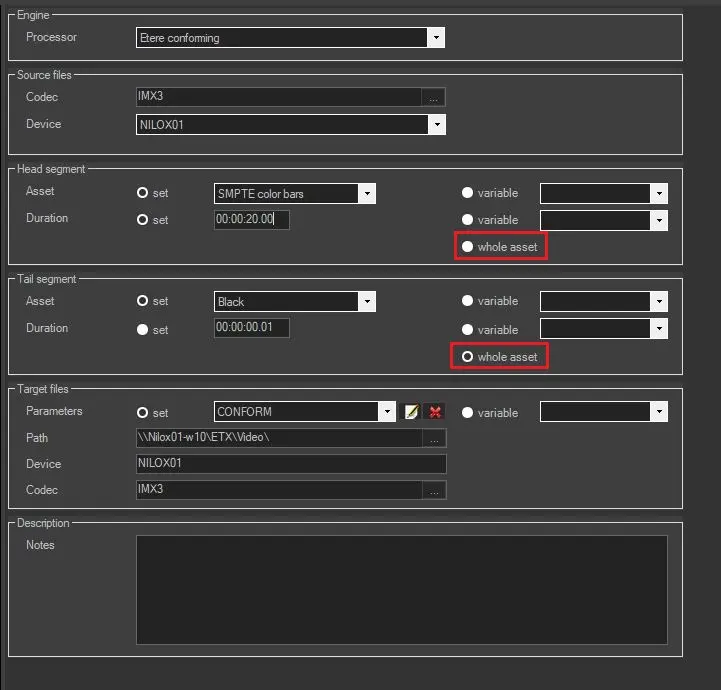
In addition, the duration of the clip can be set automatically in the profile instead of depending on the parameter set. This feature is enabled if the asset value in Head Segment and Tail Segment is set with a T-workflow parameter, and the "whole asset" checkbox is checked.
whole_asset
Engine
Processor - Select one of the applications to process conforming requests. Applications available for selection are Rhozet, Vantage and Etere Conforming.
Engine_Processor
Source files
Codec - Specify the codec of the parts to be retrieved for being conformed.
Device - Specify the cloud device from which parts to be conformed will be retrieved.
NB: These parameters will indicate to the conforming action (EtConform.exe) the media to be processed for completing the conforming request. For instance, files with the wmv codec stored in the \\archive\lowres\ device.
Head Segment
Asset - Select the asset to be added at the start of the conformed video.
NB: Please note that only system assets will be listed here. Moreover, the head asset must be available in the source device with the source codec.
Duration - Length of the asset selected for the head segment. Even if the duration is 0 (zero), this option must be enabled.
Whole asset - Automatically set the duration of the clip. The duration is read at the time of conforming operation; It does not depend on the value specified in the Duration parameter.
Tail Segment
Asset - Select the asset to be added at the end of the conformed video.
NB: Please note that only system assets will be listed here. Moreover, the tail asset must be available in the source device with the source codec.
Duration - Length of the asset selected for the tail segment. Even if the duration is 0 (zero), this option must be enabled.
Whole asset - Automatically set the duration of the clip. The duration is read at the time of conforming operation; It does not depend on the value specified in the Duration parameter.
Target Files
Processor data - Depending on the selected processor, it will be required to set one of the following options:
- XML GUID: Enter here the identification code of the Rhozet profile to be used to generate the final conformed file.
NB: The Rhozet's Module GUID used by default is {E10E642E-A959-4358-8FB1-9DBC87260E1A}. Please refer to the "Common Filters for Transcoding" chapter to see a list of other most commonly used filters.
- Vantage Params: Enter the parameters (e.g. host, port, etc.) related to the Vantage server to be used to perform the conforming operation.
- Parameters: Enter the profile used to perform the conforming operation. By selecting the Etere Conforming engine as a processor, you can create a new transcoding profile, save the transcoding profile as another profile, or delete an obsolete transcoding profile.
Path - Specify the target path on which the conformed file will be stored once conformed.
Device - The cloud device related to the previously selected target path.
Codec - Specify the codec with which the conformed file will be stored in the database.
Description
Notes - Enter here any further information related to the conforming profile.
NB: To be performed, the conforming needs all files (sources, head and tail) to be available in the source device.
Operating sequence
It's worth mentioning that the parameters set here are used in the following order during the conforming process:
1. Parts required for the conforming are retrieved from the "Source device"
2. Retrieved parts are conformed using the "XML GUID" profile, according to the following structure:
CONFORMED VIDEO
Head segment
asset: asset_head
duration: 00:00:03,00
Parts segments
asset: video1+video2+video3
duration: 03:25:45,00
Tail segment
asset: asset_tail
duration: 00:00:03,00
3. Once processed, the conformed file is stored in the "Target path"
 Conforming_Settings
 whole_asset
 Engine_Processor