59.8.2.5 Configure the cleanup parameters
To enable the automatic device space cleanup of a particular resource, it's required to configure the following parameters in the resource properties:
Properties_PC_(21)
Pooling frequency - Specify the time in minutes that must be passed before the monitoring console's next check of the used space.
Used space threshold - Indicate the maximum storage space percentage on the resource allowed for storing media. If the Monitoring Console detects that this value has been exceeded, the "delete workflow" will automatically launch to free space on the resource and respect the threshold set here. See the Device Space Cleanup chapter for details about the cleanup process.
If the used space threshold exceeds the set value, the space cleanup would not triggered immediately; it would be triggered in conjunction with the value specified in the "Polling frequency" parameter. For example, if the "Polling frequency" is set as "120" (2 hours) and the used space threshold exceeds 30 minutes after the last polling, the space cleanup would only trigger after 90 minutes when the Monitoring Console scan the used space of the current resources.
NB: To trigger the deletion workflow automatically, the "Execute Devices Cleanup feature from this console" option must be enabled.
Delete workflow-friendly name - Select the custom T-workflow to be attached to the assets stored in the meta device to free up disk space. See Configure the cleanup workflows chapter.
Max active T-workflows - Set the maximum number of assets for which the "deletion workflow" can be simultaneously executed. Every time a cleanup is required, the Monitoring Console calculates the number of active T-workflows, and if it's less than the maximum allowed, the workflow will be launched.
Saved query - To retrieve the assets where the workflow will be launched, you need to specify which saved query will be launched.
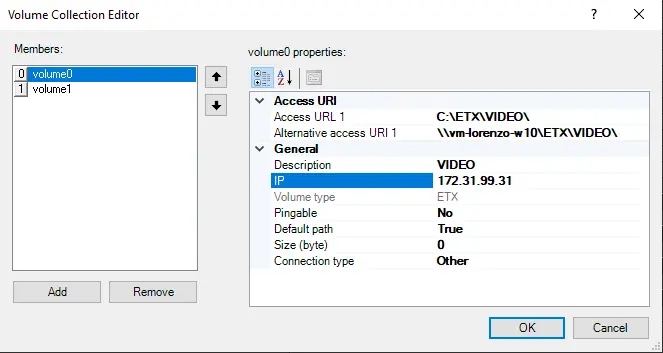
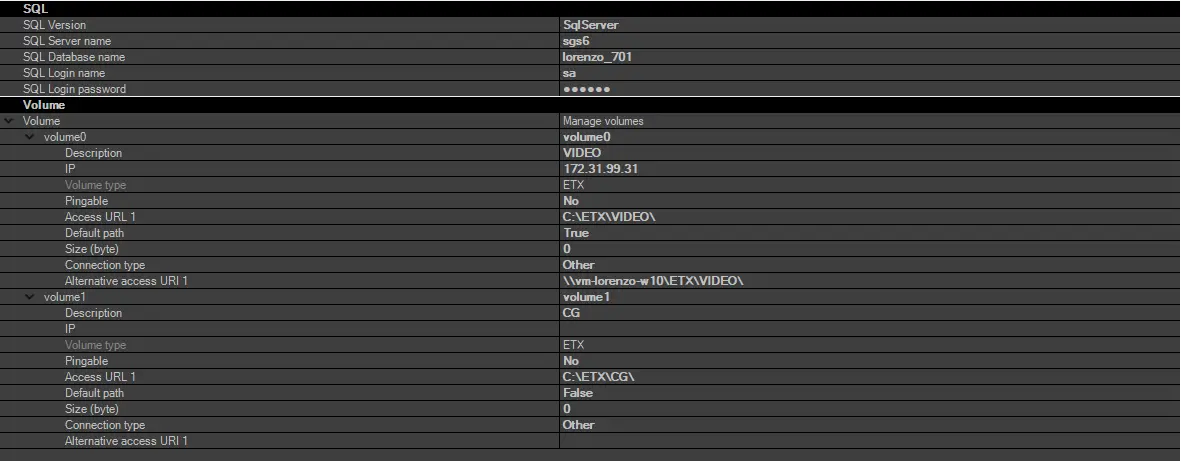
In the volume parameters, you can specify a local path in the URL address and trigger the "cleanup" when the used space threshold is reached. The paths for media operations are defined in the "Media Folder" settings in the Etere Configuration module.
SQL
Cleanup Priorities
When the device space Cleanup function is activated, the cleanup is performed on a priority basis, according to the paths set in the fields below:
Volume Collection Editor
•1st priority path: The "Alternative access URI" path is set in the device configuration.
•2nd priority path: The "Alternative access URL" path is set in the storage volume.
•3rd priority path: The general "Access URL" path set in the storage volume.
NB: If the Alternative access URI is similar to the Access URL, the path in the Alternative access URI is not required.
NB: When accessing the Media Folder through Web service, you must enter a password to authenticate the user name. The password entered would be encrypted and invisible to the user.
 Volume_Collection_Editor
 SQL
SQL
.webp "Properties_PC_(21)") Properties_PC_(21)
Properties_PC_(21)