59.3.9.58 Live Check
Action Description
The Live Check action allows checking if an asset is either or not a live asset, thus allowing one to take a specific action (e.g. skip file copy) depending on this check.
Action Parameters
To create an action of this type, the following fields must be compiled:
Parameters
Name - Insert a short descriptive name for the action (e.g. "Live check on channel 3").
Check type - Set here the type of check to be performed; available types include:
Live yes/no - If selected, the action will return only two outputs:
Not live Live
Select live channels - If selected, it will be possible to specify the channel that will determine the following outputs:
-Not live Live from selected channel Live from another channel
-In case the "one state for each channel" is enabled, possible outputs will be:
-Not live Live from channel 1 Live from channel 2 Live from...
How to use it
To check if an asset is either live or not, for example, to skip restoring files into a video server, it is first required to include the "Live Check" action into a T-workflow using the T-Workflow Designer:
Live_Check_action_into_a_T-workflow
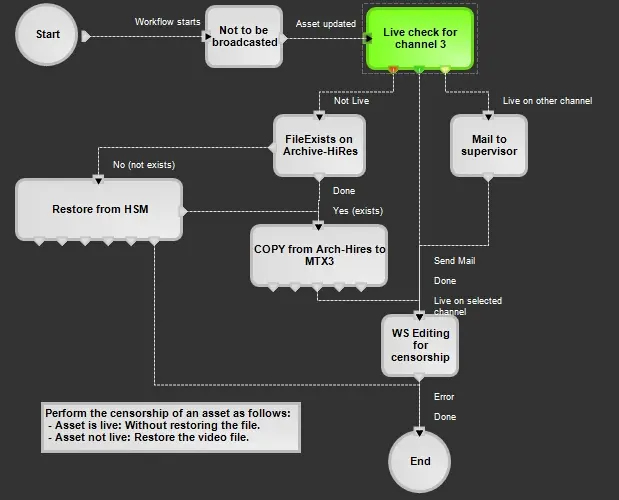 Live_Check_action_into_a_T-workflow