84.4.4.8 STANDARD > SKY > EPG XML
Export Scope
The SKY - EPG XML export function allows exporting an XML file containing the broadcast playlist of one or more days including the EPG information related to the events scheduled on them.
Notice that in case of exporting commercial data, this export function will have to be used along with Etere Air Sales, the module on which the commercial structure is created and EPG data is inserted.
Export Parameters
This procedure is divided in two main fields:
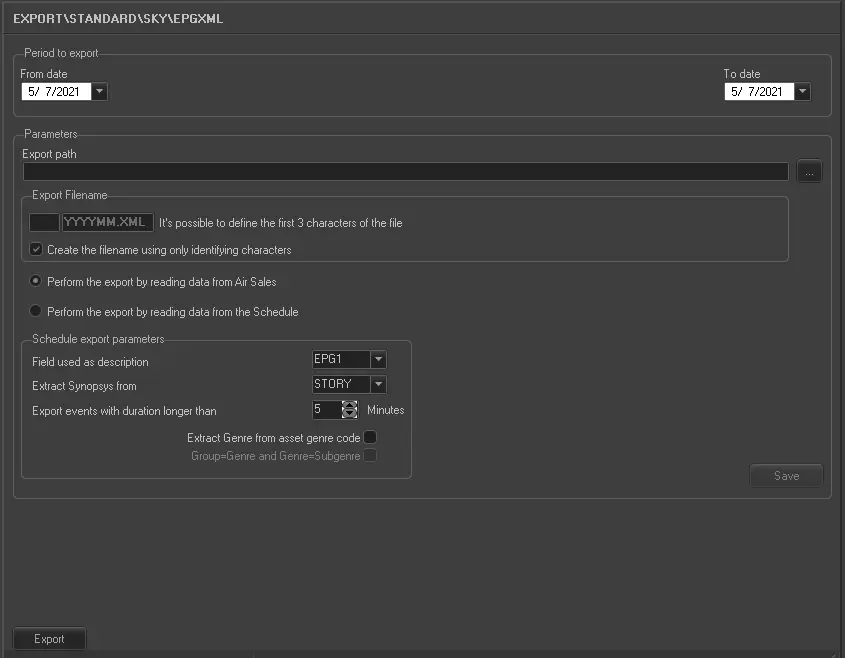
5070_Export_standard_sky_epg_xml
•Period to export
Here we can select the interval of days (from date - to date), from where the schedule will be taken.
•Parameters
In this section the user is able to select the content of the file:
•Export path: Specify the path where the file will be saved once exported.
•Export filename: The name of the exported file will have the format 'xxxYYYYMM.XML', where xxx are 3 characters that will go at the beginning of the file's name, these characters are used, for example, to indicate the station (f.e. MTV2009031.XML).
❑Create the filename using only identifying characters: When defining prefix characters, use only the identifying characters defined by user.
•Perform the export by reading data from Air Sales: If enabled, EPG data will be retrieved from the commercial structure.
•Perform the export by reading data from the schedule: If enabled, EPG data will be retrieved from the asset form of scheduled events.
•Schedule export parameters: Specify how certain data fields should be exported:
- Field used as description: Select the asset form's field (i.e.: EPG1,EPG2 or Story) intended to be used as event description.
- Extract Synopsis from: Here you can select the asset field (i.e.: EPG1,EPG2 or Story) to be used as a synopsis of the event.
NB: The Story, EPG1 and EPG2 fields are specified through 'Asset Form > Metadata' section; moreover, in case the field used as Synopsis is the same used as Description, the first part of the field will be used as Description and the second one as Synopsis, both fields must be separated by the hash character (#), for example: 'Oasis Live 2009#First concert of the year at Wembley.
- Extract genre from asset's genre code: If enabled, the asset genre will be the code (e.g.: fantasy) of assets. Additionally, it is possible to use the genre group (e.g.: movies) as the genre and the genre itself (e.g.: fantasy) as sub-genre.
- Export events with a duration longer than: This parameter permits to export only those events which duration is longer than the value specified here, ignoring events with shorter durations (e.g.: spot commercials).
Note
Grouping multiple events as one program is possible (e.g. from Executive Editor) through the insertion of an EPGI event and an EPGO event before and after the group respectively, in this way all events in between them will be considered as one program. Each grouped program must have a specific EPGI event since its description is extracted from it whereas the duration is calculated as the sum of all grouped durations:
Simpson (duration: 00:29:14)
EPGI
Simpson (part1)
Spots break
Simpson (part2)
Spots break
Simpson (part3)
EPGO
Moreover, it's worth mentioning that EPGI and EPGO events are based on EPGI and EPGO types set in Configuration > Settings > Types.
Launch the export
Once the export has been configured, it can be started just by pressing the <Export> button.
 5070_Export_standard_sky_epg_xml