59.8.2.20 Visualization options
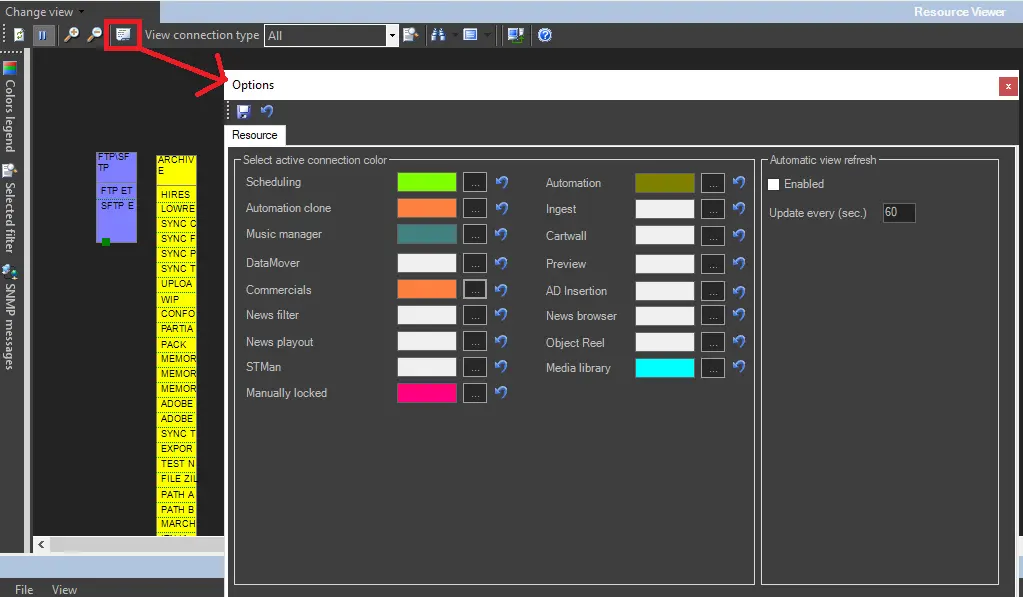
The Options button allows to customize the visualization of connections, specifying their color and auto-refreshing time for showing in real-time all monitored colors using user-defined colors. Options configurable under the "Resource" tab include:
Change_view
Automatic View Refresh: The view can either be manually updated by pressing the Refresh button in the toolbar or alternatively you can set the program to automatically update the view with a given frequency (seconds) by activating the "enabled" parameter and specifying how often the refresh should take place.
Only if the "enabled" parameter is active all connections status will be updated automatically highlighting which are in use and by which module.
Color legend: Allows you to keep alongside the resource map the key to which color represents which active connection facilitating the management of the resource map.
NB: Please note that default colors for system connections cannot be changed (Video=blue, LAN=green, etc).
 Change_view