84.2.4.2 Audio Over
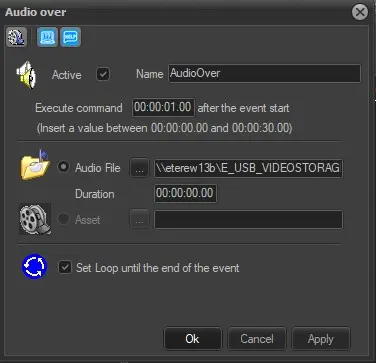
The Audio over secondary event allows to overlap an audio over the main event, parameters required to be set in order to configure it correctly are:
Audio_Over
Active: Check this parameter to enable the secondary event, leave it unchecked to disable it.
Name: Enter a brief descriptive name.
Icon: Double-click on the default icon to change it with a more suitable one.
Execute command "hh:mm:ss.ff" from event start: Indicate the time (a value between 0 and the total duration of the primary event) that must pass once the event has started before starts overlapping the audio,
Audio File: If the audio file is selected, it will be possible to browse for locally/network stored audio files (i.e.: mp3, wav) as well as define its duration.
Asset: Use it instead of the 'Audio File' option if it is intended to use an audio/file belonging to an asset already existing in the system.
Set loop until the end of the event: If this parameter is enabled, the audio will last till the end of the primary event, otherwise (not checked) the audio will last only for its duration.
Media Library [F7]: Open the Media Library clicking on this button on the secondary event's toolbar. It allows to load the asset related to the primary event for which the secondary event is being defined. If there are unsaved changes, before opening Media Library a message will be prompted, asking to save or not the modifications to the secondary event.
 Audio_Over