59.4.20.10 Inserting Transformation Rules
A transformation rule is a criterion that allows altering a specific attribute of a Carbon project; each Flexy Converter project allows inserting an unlimited number of transformation rules through any of the following two methods:
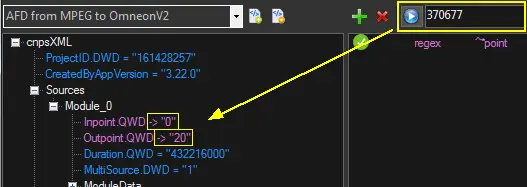
Drag and drop an attribute into the list of rules:
Transformation_Rules
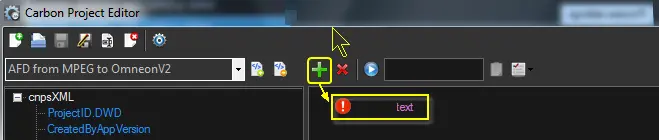
Press the [+ Add] button:
Add]_button
Once the rule has been inserted, you can start compiling all its required parameters:
Project parameters
Parameter: Description
Description: Enter a brief description of the attribute to be overwritten.
Parameter: Comparison mode
Description: Select how the "selection path" and the "attribute name" will be compared to determine if they will be transformed or not.
Exact text match - The path and attribute will be compared as case-sensitive text, so the only node matching both of them will be transformed.
Regular expression - The path and attribute will be interpreted as a regular expression, so all nodes matching them will be transformed in the same way.
NB: For detailed information, refer to www.regular-expressions.info.
The " Attributes matching " chapter provides further information, and examples of comparison modes are available in the "Attributes matching" chapter.
Parameter: Hidden
Description: If checked, the transformation and settings will be hidden from the end-user to prevent him from changing them.
NB: Users with "admin" permissions will be able to view transformations even when set as "hidden".
Parameter: Selection path
Description: Configure this parameter according to the comparison mode:
exact text match - Enter the full case-sensitive path to the attribute within the project. (e.g. CnpsXML/Destinations/Module_0/ModuleData)
regular expression - Enter the search pattern to be used to match attribute paths. (e.g. Module^*)
NB: The [^...$] button allows escaping regular expression's special characters (e.g. ( ) * + ? \ ).
Parameter: Attribute name
Description: Configure this parameter according to the comparison mode:
exact text match - Enter the full case-sensitive name of the attribute in the selection path. (e.g. CML_P_BaseFileName)
regular expression - Enter the search pattern to be used to match attribute paths. (e.g. ^*point).
NB: The [^...$] button allows escaping regular expression's special characters (e.g. ( ) * + ? \ ).
Parameter: Transformation
Description: Specify the Etere data to transform the content of attributes. Available data include:
Select database file - Use the filename of a file stored in a given metadevice with a given codec.(e.g. CLIP341344.MXF)
Select custom data - Use a custom string built with the Rules Editor and based on table fields and flexi-metadata. (e.g. [02.01.17.01.00.00.00.00]_%0:s_[cod_progra].MXF)
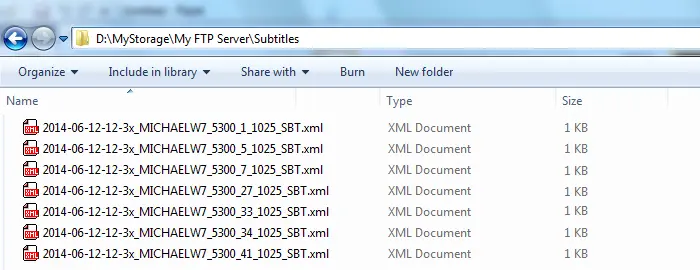
Select subtitles file - Use a specific language subtitle exported with the following name:
YYYY-MM-DD-HH-Mx_Computer_ProcessID_AssetID_Language_SBT.XML
(e.g. 2014-06-12-12-3x_MICHAELW7_5300_1_1025_SBT.XML)
Files are created in the cache path when Flexy Converter starts up or every 10min:
Flexy_Converter
(created files are not deleted automatically but are preserved)
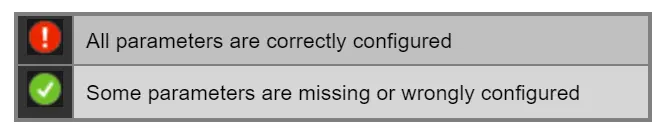
Once parameters are compiled, the system will indicate to the user whether the rule is ready or not to be used:
rule_is_ready_or_not_to_be_used
Rules functions
The following functions are available for transformation rules:
Transformation_Rules
Function: Add
Description: Insert a new transformation rule in the project.
Function: Remove
Description: Remove the selected rule from the current project
Function: Preview
Description: Display, for all attributes matching transformation rules, the Etere data expected for a given asset:
Function: Copy
Description: Copy the entire Carbon XML job in the clipboard:
<cnpsXML ProjectID.DWD="161428257" CreatedByAppVersion="3.22.0">
<Sources>
<Module_0 Inpoint.QWD=""
Outpoint.QWD=""
...
</cnpsXML>
Function: Show
Description: Select which information should be displayed in the attributes tree:
show attributes content - Display in the attributes tree the original value of attributes (i.e. as in the project)
the show transformed value - Display in the attributes tree the new value of attributes (i.e. as in Etere)
 Transformation_Rules
 Add]_button
 rule_is_ready_or_not_to_be_used
 Flexy_Converter
Transformation_Rules
Flexy_Converter
Transformation_Rules