59.3.2 Conforming
What is Conforming?
A conforming operation is a process that consists of merging multiple video segments into a single video file. Etere provides conforming capabilities for both conform segments from an EDL related to a single asset or a story related to multiple assets.
CONFORMED VIDEO
Part #1:
asset_3543
mark in: 00:01:07,15
duration: 00:00:03,00 ...
Part #2:
asset_6945
mark in: 00:00:54,53
duration: 03:25:45,00 ...
Part #3:
asset_3451
mark in: 00:01:13,42
duration: 00:00:03,00 ...
Note: In case the asset containing a source segment has subtitles, the conformed segment will inherit the subtitles related to its time codes. If the subtitle's font size, font colour or border colour does not conform to desired requirements, you can customise the font size and colours settings in Global Subtitles parameter.
NB: The Conforming operation requires a valid MAM (Media Asset Management) license to be present.
How does ETERE conform to media?
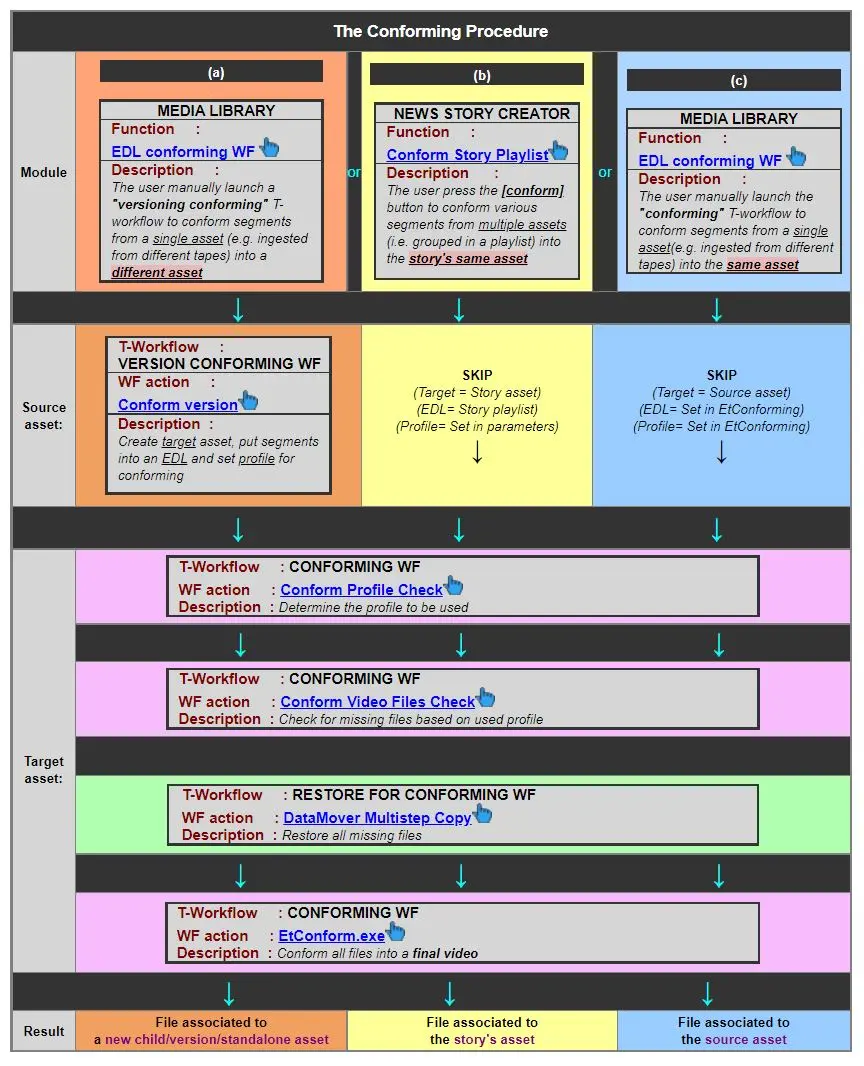
The conforming process is the automatic file-based operation that permits confirming the final media; it's used from various Etere modules following the sequence specified below:
Conforming Procedure
The Conforming operation would retrieve files in the source path, including files recorded in the sub-paths, considering the last frame of every segment, and merge all files into a single video file. Upon confirming, the file duration in the source path is calculated to match the duration of the output file.
In addition, the conforming would check the available disk space in the destination path before and after the conforming process to ensure sufficient space is allocated to complete the action.
Presently in Etere, there is no report available for tracking an asset's original name and conformed name; you can use the Conforming Date option in the Media Library Search function to filter the desired assets.
Note 1: Conforming can be performed from multiple modules, Media Library (workflow) and News Story Creator.
Note 2: News Story Creator's conforming creates a new asset and conforms the file.
Note 3: Media Library can either create a new asset to hold the conformed file or conform the file on the source asset.
Note 4: For a step-by-step description of how to conform assets from the Media Library, please refer to the EDL conforming T-workflow chapter.
Note 5: for information about how the Conforming of a portion of the playlist works, see the related chapter in this section.
Conforming configuration
The various settings and parameters required by the conforming process are performed from the following sections:
Configuration > Configuration Editor > T-Workflow > Default T-Workflows - Set here the T-workflows for "Conforming" and "Restore for conforming".
Configuration > Configuration Editor > Conforming > Conforming settings - Set all parameters specifically related to the conforming of video segments from the same asset.
MAM > News Story Creator > Parameters - Set all parameters specifically related to the conforming of audio/video segments of multiple assets.
 Conforming_Procedure