59.6.2.234 Grass Valley/Oxtel MC resource editor
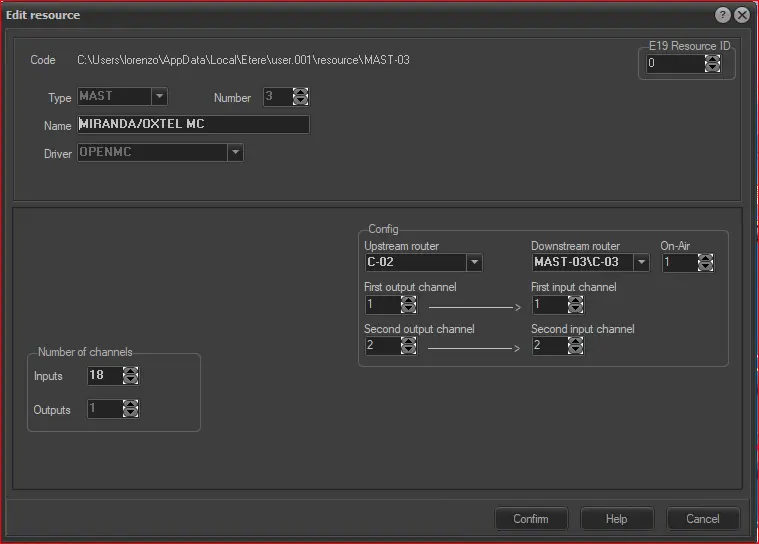
The "Edit Resource" form allows one to define an Open MC (open master control) resource. The fields required for its configuration are following described:
open_master_control_resource
READ-ONLY INFO
Code - The path of the resource that you are editing is displayed.
Type - Shows the type the resource belongs to (e.g. MAST).
Number - Ordinal number that differentiates the resource from others of the same type.
RESOURCE PROPERTIES
Name - A brief description that identifies the resource must be inserted.
Driver - It's fixed: OPENMC.
E19 Resource ID - Optionally, insert the ID of the resource created under the Resource Editor module for this resource. This identification number is used, for example, to check the storage space usage of the resource.
RESOURCE PARAMETERS
Number of channels - Specify how many input channels (e.g. 8) and output channels (fixed to 1) will be managed by the Open Master Control. This information is used to edit the channels in the resources tree.
Config - Indicate the upstream (source) and downstream (target) video routers as well as their channels:
Upstream router - Select the upstream router on which switches will be performed, then set its Preview/Program channels:
•1st output channel (a): the output of the upstream router linked to the 1st input of the downstream router. This is the "preview" channel.
•2nd output channel (b): the output of the upstream router linked to the 2nd input of the downstream router. This is the "program" channel.
Downstream router - Select the OXTEL downstream router (automatically created along with this resource), then set its A/B and on-air channels:
1st input channel (x): the 1st input of the downstream router.
2nd input channel (y): the 2nd input of the downstream router.
On-air (z): the output of the downstream router. This is the "on-air" channel.
NB: From here, it will be possible to select only those upstream/downstream routers currently assigned to the Automation function with Slave rights.
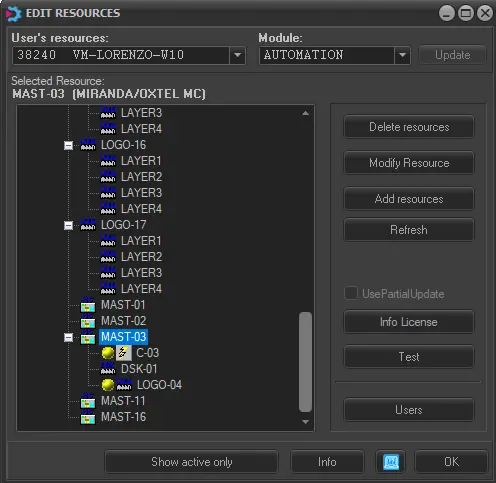
Once compiled, click the [Confirm] button to add the MASTER CONTROL resource to the Resources tree. An Oxtel MC resource will be created containing the following -automatically created- resources:
open_master_control
•1 Oxtel Router (e.g. C-04)
•1 Oxtel Downstream-keyer (e.g. DSK-05)
•1 Oxtel Logo (e.g. LOGO-02)
At this point, it is now possible to assign the resource to specific users and functions:
Device users: Select the resource and click the [Users] button.
Grass Valley/Oxtel MC resource editor - User
Indicate to which user and to which module or program the relevant resource must be activated by specifying the following:
READ-ONLY INFO
Resource - Code of the resource channel.
Name - Name of the resource channel.
ID Number - Identification number of the resource channel.
USER INFORMATION
PC Name - Indicate the specific workstation (user) for which the resource will be allowed. Once selected, it will be automatically retrieved and displayed the ID number and PC name corresponding to the selected user.
Function - Indicate the module (function) on which the user mentioned above will be allowed to use the resource in question
Wire connections - Here below are provided the wire configurations required for serial connections:
Serial connection wire
232 COM
PC side (DB9F) Master control side (DB9F)
2 Rx --------------------------- Tx 3
3 Tx ---------------------------- Rx 2
5 GND ---------------------------- GND 5
422 COM
PC side (DB9M) Master control side (DB9F)
1 GND -------------------------- GND 6
2 Rx- --------------------------- Tx- 1
3 Tx+ -------------------------- Rx+ 3
7 Rx+ -------------------------- Tx+ 2
8 Tx- --------------------------- Rx- 4
 open_master_control_resource
 open_master_control_