203.1.1 Set SQL Database
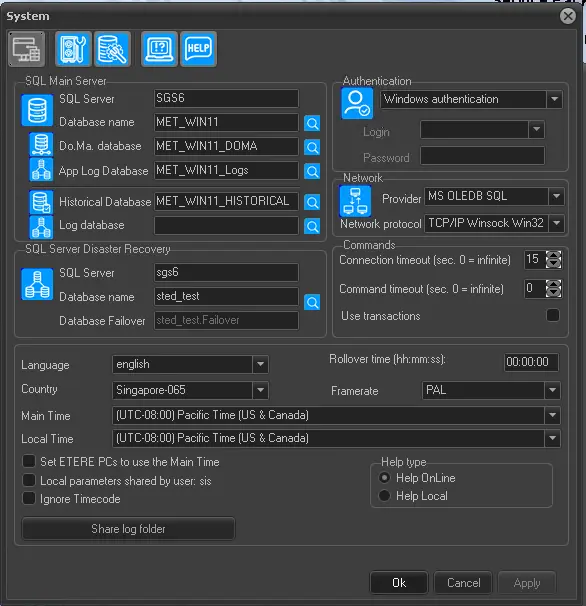
Once you have clicked on the 'SQL Server' button, a window pop-up allows you to set the parameters for connecting to the SQL Server. These parameters are the same set on 'Etere Configuration | Settings | Basic | System', if your system already connected to SQL Server, no changes are required. The relevant parameters are described below:
Etere_Configuration_Settings_Basic__System
SQL Main Server
Set the parameters connecting to the MAIN database:
•SQL Server: Enter the name of the MAIN Server where you have installed the SQL Server.
•Database Name: Input in this parameter the name of the database that resided in the SQL server.
SQL Server Disaster Recovery
Enter in this section information regarding the database where your Main database will be copied:
•SQL Server: Enter the name of the BACKUP Server where the database backup will be restored. It must be different from the main server.
•Database Name: Input in this parameter the name of the database that resided in the SQL server.
Network
Indicate which network provider and protocol will be used for connecting to the databases. The information can be obtained from the Network/System Administrator.
Connection with the database
Select the access modes to the SQL database:
•Windows authentication. If active, the access to the SQL server is authenticated by Windows user authentication.
•SQL server authentication. If active, the access to the SQL server is authenticated by User ID and Password associated with the SQL server. The user ID must be set on the SQL server (created by the administrator)
•Use SQL Server Login. If active, SQL server authentication will be made through user access ID and password. Those parameters must be inserted on every start.
 Database_configuration