70.2.6.3 Master/Clone Headquarters
In case system redundancy is required, it is suggested to implement a Master/Clone system composed of two headquarters (master and clone); the clone Headquarters starts as soon as the main stops working, thus making the system entirely fault-tolerant.
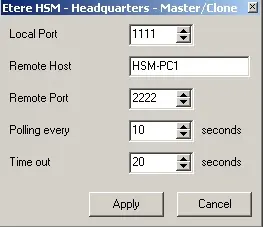
To configure a Clone Headquarters, just go to the Configuration menu, select the Master/Clone option, and set the parameters shown below. These parameters must be placed in the master and clone servers.
Headquarters - Master Clone
•Local port: Indicate the port on which the current headquarters server will made available for communicating with the second headquarters server.
•Remote host: Enter the IP address of the second headquarters server.
•Polling every: Dictate the time interval for interrogating the other headquarters server.
•Time out: Specify the maximum time for waiting for a response from the other headquarters server before switching the current Server to master mode.
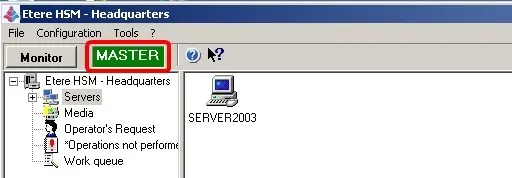
Once configured, in the top part of both the master and clone Headquarters, it will be indicated if they are running in either master or clone mode:
Headquarters 1
At this point, it will be possible to switch between the primary and clone headquarter just by going to the Configuration > Master/Clone menu and selecting the 'Switch' function.2
NB: When the Clone HSM Headquarters is removed or disconnected, it is recommended that all network parameters be deleted from the Configuration menu.
Adding a Clone Headquarters
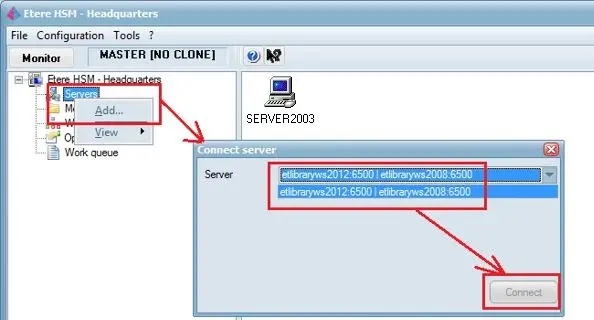
To add a Clone Headquarters, simply right-click on the HSM Server and select <Add> to open a server connection dialogue, select the Server to be assigned as Clone Headquarters and click the <Connect> button to establish a connection to the Server.
Headquarters 2
NB: In a controlled environment, there must be a limit to a maximum of 2 HSM Headquarters running simultaneously as Master and Clone; a 3rd instance of HSM Headquarters would result in workflow malfunction.
 Headquarters_2
 Headquarters_1
 Headquarters_-_Master_Clone