59.3.9.139 Recording Date Check
Action Description
The Recording Date Check action allows querying the database to know if an asset is older than "n" days, that is if its media has been ingested more than "n" days ago.
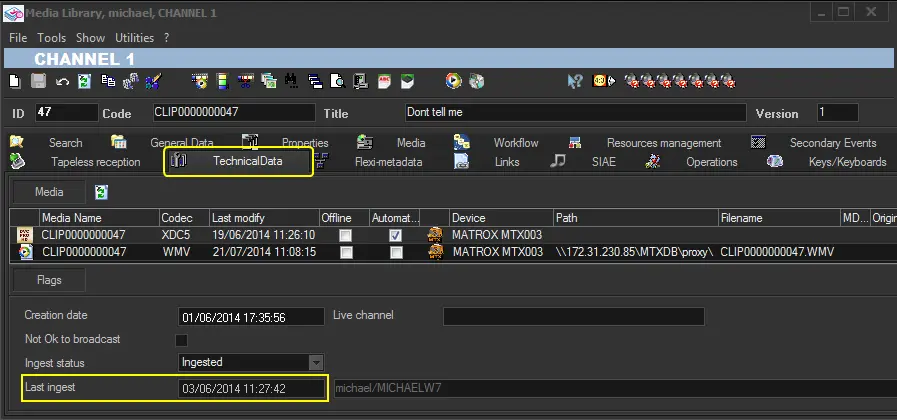
Here below is presented an example regarding the execution of a "recording date check" action, illustrating some possible results varying according to the date on which the action is executed:
3740_recording_date_check
Last Ingest Date 03/06/2014
Current System Date 03/06/2014 0406/2014 05/06/2014 06/06/2014 07/06/2014 ...
Recording Date Check "3" (i.e. older than three days?) No No No Yes Yes Yes
Action Parameters
Under this section, it is possible to create new actions based on the following parameters:
General info
Name - Enter a self-descriptive name for the action (e.g. "Recording Date Check: older than seven days?")
Number of Days - Specify the days to be checked in the past.
For instance, entering "3" will check if the asset's last ingest date is older than three days.
Depending on the success of the requested operation, one of the following results will be returned by the action:
YES (file is older than "n" days)
NO (file is not older than "n" days)
How to use it
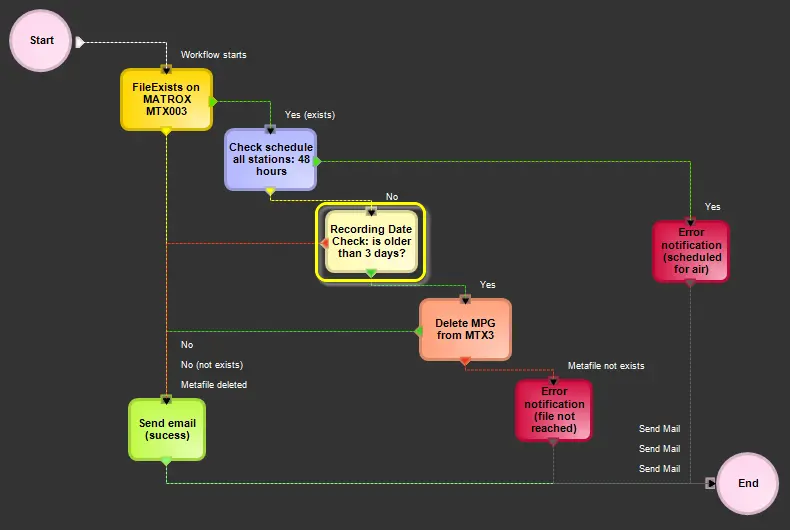
Recording data check actions forms can be used (from the T-Workflow Designer) to, for example, determine if an asset can be deleted or not based on its last ingest date:
3739_T-Workflow_Designer
 recording_date_check
 T-Workflow_Designer