15.11 T-workflow Monitor
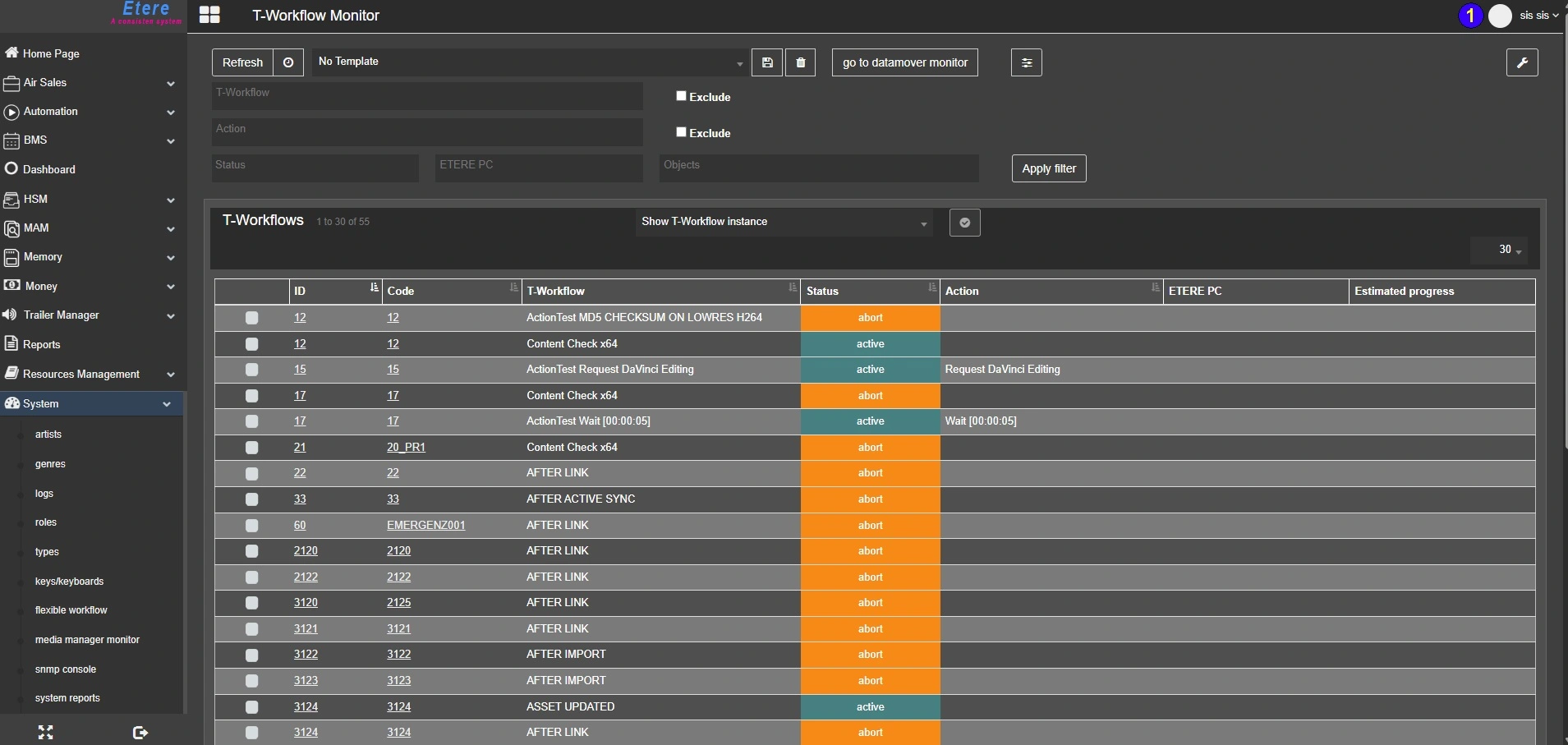
The T-Workflow Monitor allows supervisors to monitor all T-workflows executed on certain stations, allowing them to manage assets and related operations such as asset transfers, quality checks, archival, etc.
It presents an intuitive interface to view and control the total number of instances related to all T-workflows and the details status. Moreover, the creation of templates allows a quickier selection of the filters and a faster visualization of the needed t-workflow instances.
T-workflow_monitor
The T-Workflow monitor on Etereweb is made by 2 main areas, described below.
FILTERS SECTION
At the top of the page, the Filters section allows to search the needed workflows and configure the columns of the results table.
Refresh / Auto-refresh: Click the Refresh button to reload the results table or activate the Auto-refresh to reload it automatically at a user-defined time interval. The reload time of the auto-refresh can be set in User preferences > General settings > T-Workflow monitor reload time (sec).
Templates: Once the filters are set, it's possible to save them in a template, to reload them easily at a later time. In order to save a template, follow these simple steps:
- Set the desired filters
- Select the templates drop list and type a name in the text box
- Click the Save template button beside the templates list.
Then, to recall the saved filters, simply select the template from the list. Once a template is selected, it's possible to delete it, using the Remove template button.
Note: When a template is selected, the filters are not applied and the search is not performed until the button Apply filter is clicked.
Go to datamover monitor: Open the Etereweb Datamover Monitor on another browser tab.
These are the filters available and for each of them is possible to select more than one value:
• T-Workflow: Search only specific workflows. Activate the Exclude flag to search for all the workflows but the ones specified.
• Action: Search only the workflows that are processing specific actions. Activate the Exclude flag to search for all the workflows except for the ones processing the actions specified.
• Status: Retrieve all the workflows which status is "Not started", "Workflow abort", "Workflow active", "Workflow complete" or "Workflow fault".
• ETERE PC: Filter the search for all the workflows launched from specific ETERE PCs or which actions are being executed from specific ETERE PCs.
• Objects: Narrow the search looking for the workflows launched on Asset IDs, Personal data IDs, Schedule IDs or Segment IDs.
T-WORKFLOWS SECTION
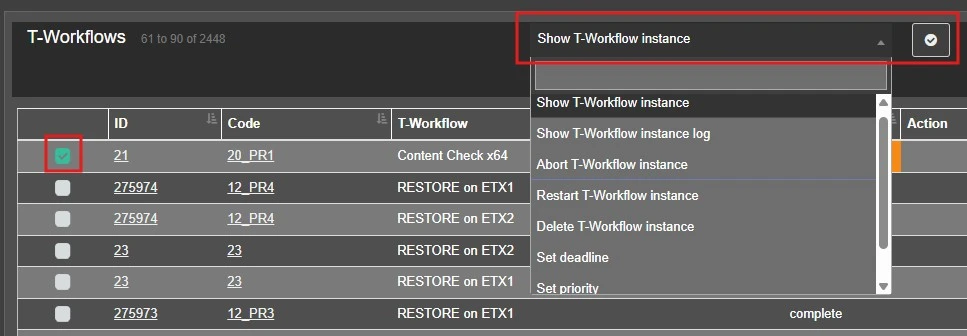
The T-Workflows section, displays the results of the search and allows to perform the operations listed below. To launch an operation select with the checkbox one or more workflows from the results, choose the operation from the list and click the Apply button beside.
wfmonitor_operations
Moreover, clicking on the ID or Code it's possible to open the asset where the wf has been launched and on the top-right corner of the section a droplist allows to set how many result should be displayed for each page (10, 30, 60, 150, all).
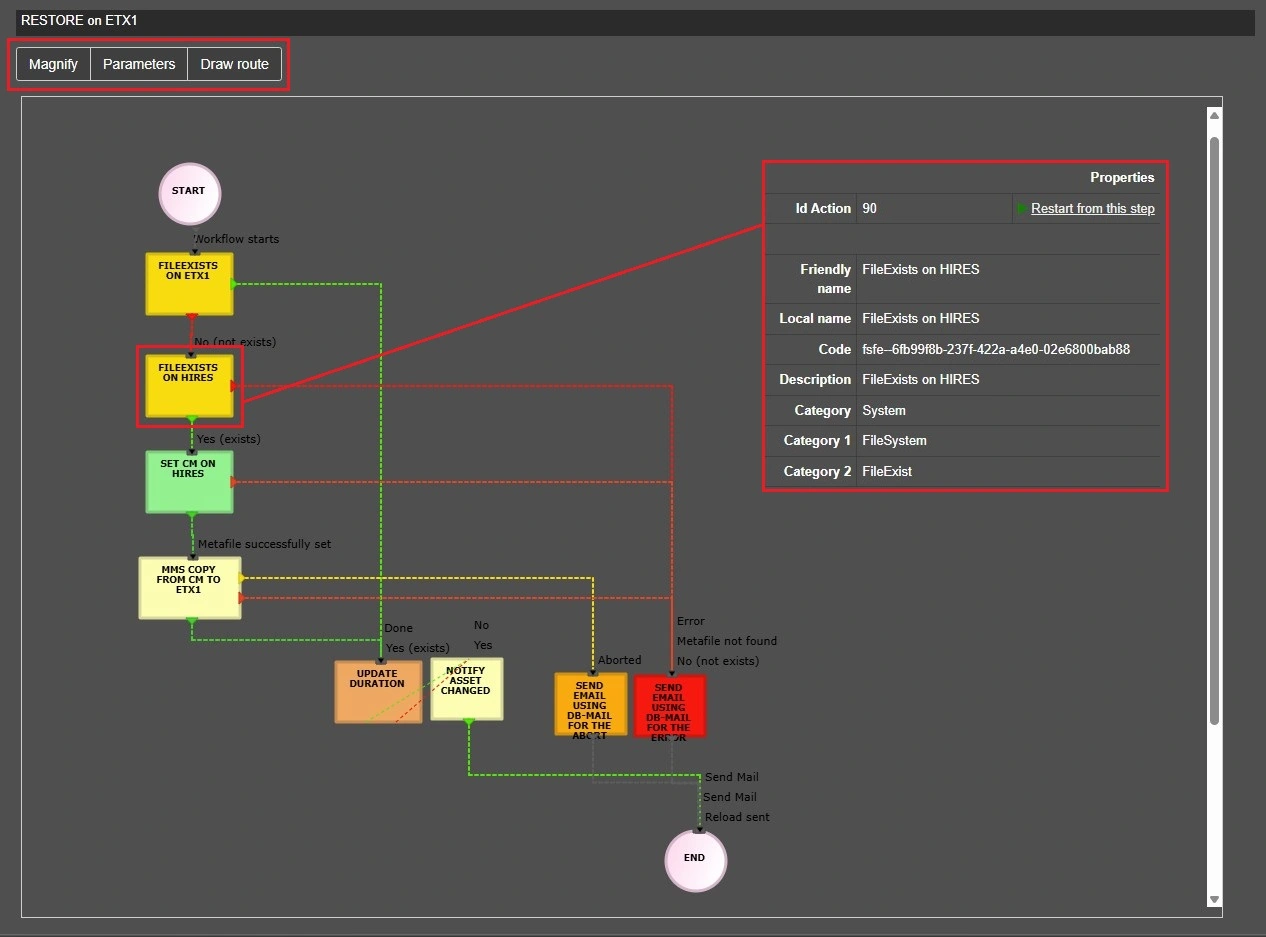
• Show T-Workflow instance: Show the workflow diagram in a separated window. From the diagram view, like in the asset form, it's possible to use the tools Magnify, to have a zoomed view of the wf according to the pointer position, Draw route, to highlight the sequence of actions performed, or Parameters, to see which custom wf parameters have been set for the workflow. Moreover, selecting an action, it shows the action properties and allows to restart the wf from that specific action, clicking on Restart from this step. This operation can be done on only one workflow at a time. If more than one wf is selected from the search results, an error will be returned.
wfmonitor_show_wf_instance
• Show T-Workflow instance log: Open a new window to display the wf logs table. This operation can be done on only one workflow at a time. If more than one wf is selected from the search results, an error will be returned.
• Abort T-Workflow instance: Stop the selected workflows.
• Restart T-Workflow instance: Start again the selected workflows from the beginning.
• Delete T-Workflow instance: Remove the wf instance from the asset form.
• Set deadline: Change the workflow instance's deadline.
• Set priority: Define an execution priority for the selected workflows.
• Set parameter: Set a predefined parameter for the selected workflow. Parameters must be first defined in Etere Configuration > Configuration Editor > T-Workflows > Parameters. See chapter 59.3.11.1 Parameters Options for more information. This operation can be done on only one workflow at a time. If more than one wf is selected from the search results, an error will be returned.
COLUMNS CONFIGURATION
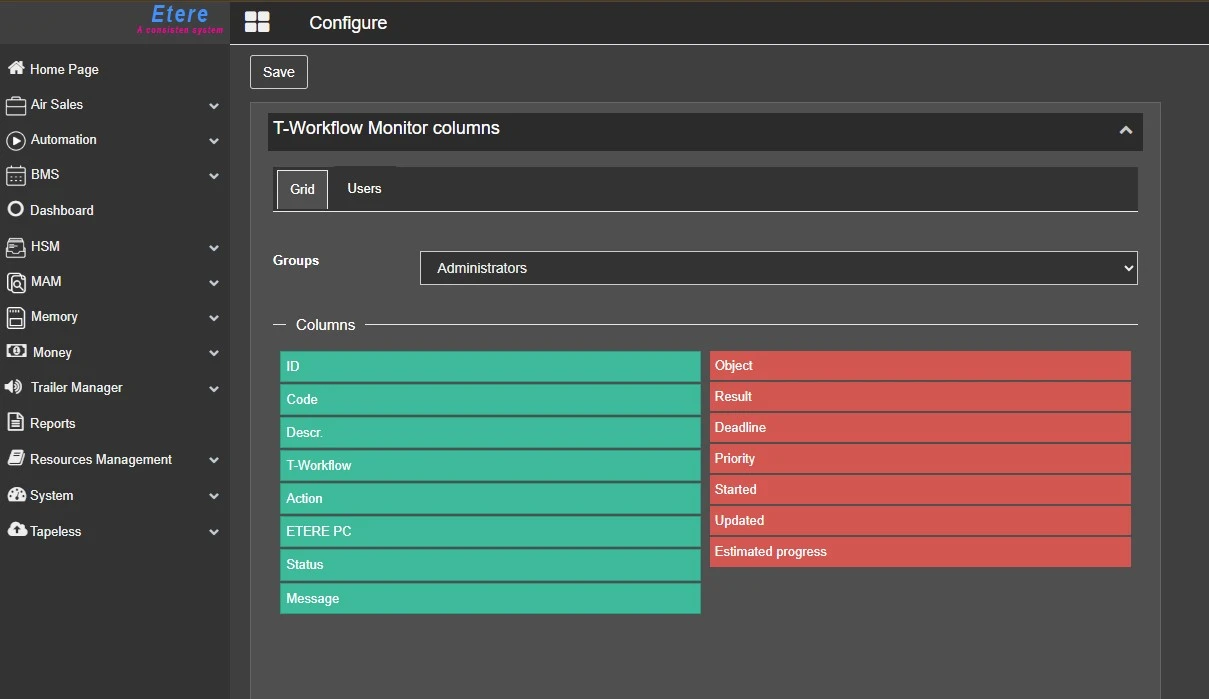
Clicking on the Layout configuration button on the top-right corner of the T-Workflow monitor, it's possible to define the columns to be displayed in the search results and their position.
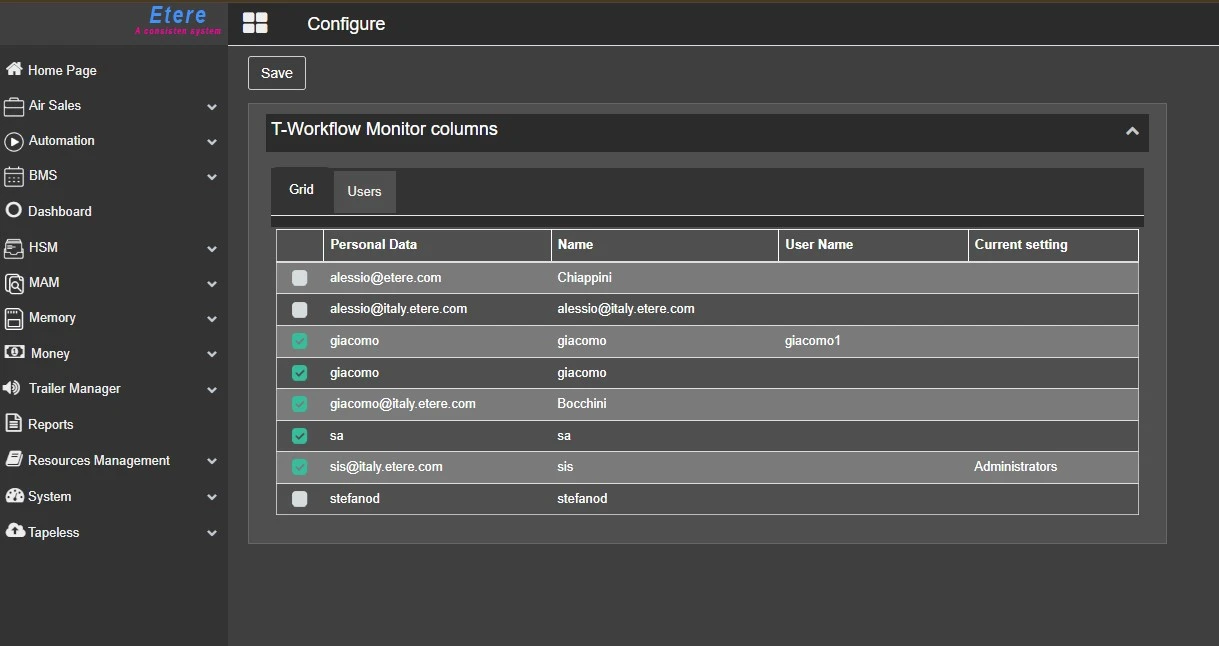
The configuration can be applied for a whole group of users or for single users and the page is composed by two tabs:
Grid: Select the group which configuration should be applied for, then drag and drop the desired columns on the green side to enable them or on the red side to disable them. The columns can also be moved up and down to change the position.
wfmonitor_columns_grid
Users: Here are listed all the users belonging to the selected group. Check the ones which the columns layout should be applied for.
wfmonitor_columns_users
Once the configuration is completed, click on the Save button and refresh the T-Workflow monitor page to display the columns layout.
 T-workflow_monitor
 wfmonitor_operations
 wfmonitor_show_wf_instance
 wfmonitor_columns_grid
 wfmonitor_columns_users