84.4.4.91 CUSTOM > WON2 ASSET XML
Export scope
The "WON2 Asset XML" export allows generating an XML file containing a set of asset metadata required by Whats' ON system. The filename of the exported file will depend on whether the operation was performed either manually or automatically:
•Manual export: MatId_yymmddhhmmsszzz.XML
where:
MatId is the WON2 code retrieved from an asset's metadata between "ABC", "LBC", "SBC" (currently used) or "TX External".
for instance:
LBC253127_140219130630123.xml
•Automatic export: The filename is defined by the calling procedure.
This export includes some tags based on Flexi-metadata, which if compiled, will be exported as follows:
Exported Tag - MatID
Required Flexi-metadata : ABC, LBC, SBC (currently used) or TX External
Type : string
Exported Tag - Aspect Ratio
Required Flexi-metadata : 169 or 43
Type : integer
Exported Tag - Definition
Required Flexi-metadata : SD or HD
Type : string
NB: Flexi-metadata Metadata is configured in "Configuration > Settings > MAM > Flexi-metadata" and compiled from "Media Library > Flexi-metadata".
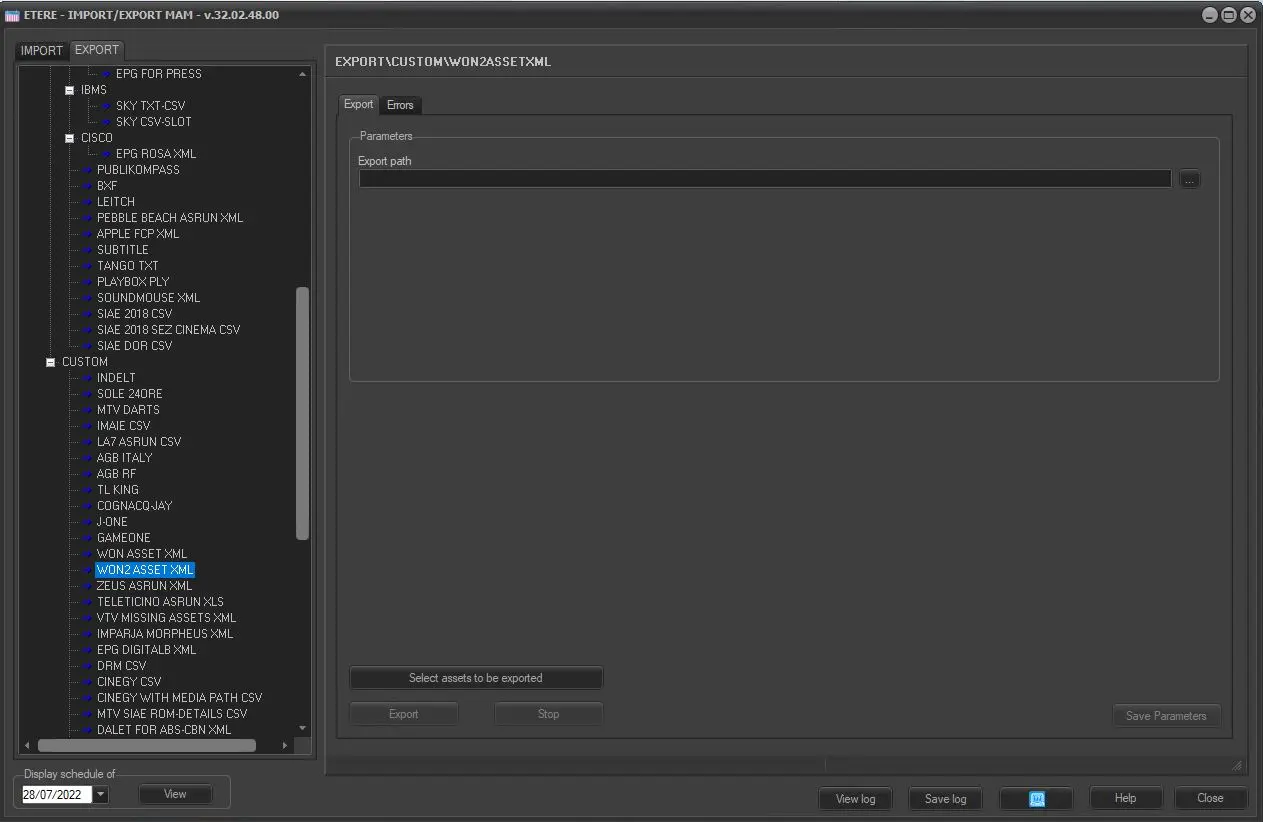
Export parameters
This export allows the following parameters to be set and then [saved]:
Export_custom_won2_asset_xml
Parameters
•Export path: Indicate the path on which the exported file will be placed.
•Select assets to be exported: Open the asset search engine to allow selecting the asset(s) for which their linked files data will be exported.
NB: Multiple assets can be selected holding the CTRL and SHIFT keys while marking assets; selections are confirmed pressing the [Enter] key.
Launch the export
Once all parameters have been correctly set, just press the <Export> button to launch the export operation.
NB the new report "EXPORT_CUSTOM_WON2_ASSETXML " has been created with the same function of "EXPORT_CUSTOM_WON_ASSETXML", but including also the following modification :
WON
2022-02-21T07:34:49.665
Retry
VLMC
comp-node-4
comp-node-5
61956
______________________________________
Sample exported file
<?xml version="1.0" encoding="UTF-8" standalone="yes"?>
<Pharos>
<Material>
<MatId>SBC032370</MatId>
<TrackTypeLink> <TrackTypeName>Video</TrackTypeName>
<StateName>Ready for broadcasting</StateName>
</TrackTypeLink>
<Track>
<TrackDefinition>
<Position>1</Position> <TrackTypeName>Video</TrackTypeName>
</TrackDefinition>
<Outcode>00:19:00:02</Outcode>
<MediaName>Browse</MediaName>
<Encoded>true</Encoded>
<IngestDate>2013-12-20T11:59:59:517</IngestDate>
<Incode>10:00:10:00</Incode>
</Track>
<Title>NARUTO Ep 141 "La Décision de Sakura"</Title>
<MaterialType>ACQUISITION</MaterialType>
<AspectRatio>12F12</AspectRatio>
<Marker>
<Absolute>10:00:10:00</Absolute>
<Timecode>10:00:10:00</Timecode>
<MarkerType>Start - Part 1</MarkerType>
<RefInCode>10:00:00:00</RefInCode>
<FrameRate>NDF25</FrameRate>
</Marker>
<Marker>
<Absolute>10:10:10:00</Absolute>
<Timecode>10:10:10:00</Timecode>
<MarkerType>End - Part 1</MarkerType>
<RefInCode>10:00:00:00</RefInCode>
<FrameRate>NDF25</FrameRate>
</Marker>
<Marker>
<Absolute>10:11:00:00</Absolute>
<Timecode>10:11:00:00</Timecode>
<MarkerType>Start - Part 2</MarkerType>
<RefInCode>10:00:00:00</RefInCode>
<FrameRate>NDF25</FrameRate>
</Marker>
<Marker>
<Absolute>10:20:00:00</Absolute>
<Timecode>10:20:00:00</Timecode>
<MarkerType>End - Part 2</MarkerType>
<RefInCode>10:00:00:00</RefInCode>
<FrameRate>NDF25</FrameRate>
</Marker>
<Duration>00:19:00:02</Duration>
</Material>
</Pharos>
NB: The <MaterialType> tag will contain the "external name" of the asset type (e.g. programme) when available; otherwise it will contain the asset Etere type (e.g. local production).
 Export_custom_won2_asset_xml