70.3.7.6 Data Pump GUI
In order to configure Etere HSM - Data Pump just follow the next procedure:
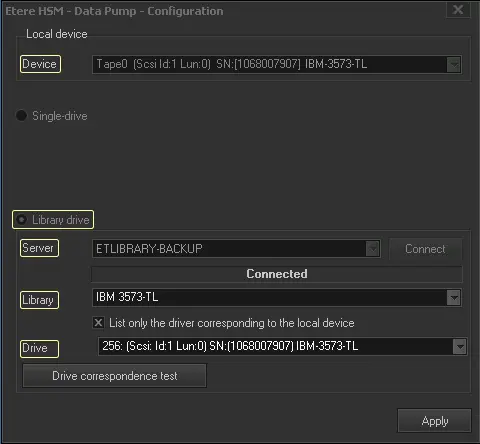
1.Set the drive parameters and press the [Apply] button:
Etere HSM - Data Pump - Configuration
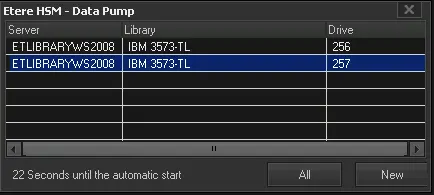
Etere HSM - Data Pump 1
Device - Select the drive device to configure from the combobox (Device),
Single or library drive - Indicate if the drive to be managed is either a single-drive (i.e. it is a stand-alone drive managed as a flash drive) or a library drive (i.e. it is inside a robotics library).
Server - Specify the server that controls the library, then, press the [Connect] button.
Library - Select the library on which the tape drive is installed.
Drive - Indicate the drive to be managed by the current Etere Data Pump instance. Drives are identified by their Serial number (if controlled using the SCSI pass-through).
List only the drive corresponding to the local device - If enabled, only those drives (e.g. \\.\Tape0, \\.\Tape1) which library's identification number (either Serial number or SCSI address) matches with the one present in the database will be available for selection.
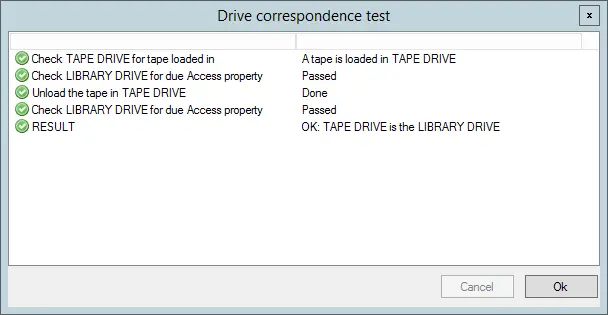
Drive correspondence test - In case of using a library drive, this function will allow to test its tape connection. The test result will be positive in case all the checks shown in the figure above are successfully completed; otherwise, an error message will indicate the negative completion of the test and the specific stage at which the test failed:
Drive correspondence test
NB: In case the tape drive is current being used by another process (e.g. another data pump instance), the test won't be possible and an error message will warn the operator about this issue.
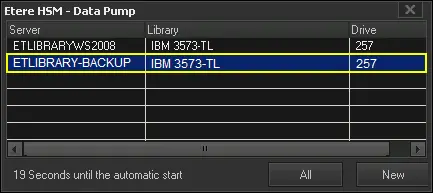
4.Once the selection is applied, the Etere HSM - Data Pump window will be displayed, showing any active operation (e.g. copy) between the cache and the 'fast' archive, and providing access to the Data Pump Configuration and the Data Pump Tools menus:
Server - Server that controls the library.
Library - Library on which the tape drive is installed.
Drive - Serial number (if controllored using SCSI pass-through) or SCSI address (if controlled using the vendor driver) of the drive to be managed by the current Etere Data Pump.
Tape - Code of the tape currently injected in the tape drive.
Loaded - Indicates if the tape is either loaded or not into the tape drive.
Cache
Asset -Currently processing asset.
Path - Source and destination paths from where the asset is being archived/stored.
Progress - Completion status of the operation.
Progress bar - Progress bar indicating the "pooling delay" (default 10s) for checking the work queue.
To request an immediate check without waiting just right-click on the progress bar:
Pooling delay 1
Message - Last performed operation, including date and time.
Tape
Operation - Currently performing operation.
Asset - Asset for which the current operation is being performed.
Tape - Tape on which the operation is taking place.
Progress bar - Progress bar indicating the "pooling delay" (default 10s) for checking the work queue.
To request an immediate check without waiting just right-click on the progress bar:
Pooling delay 2
Operations details
Step, result, time -Detailed information on each step performed by the operations. Below will be displayed more details including the number of processed blocks, elapsed time, remaining time and speed.
Status
Robotic server - Indicates if Etere Robotics is either connected or not.
NB: When performing HSM tape Archive in Data Pump, a consistency check would be performed to determine the downloaded file size, the right file size would be written into database for archiving to tape.
 Etere_HSM_-_Data_Pump_-_Configuration
 Pooling_delay_2
 Pooling_delay_1
 Etere_HSM_-_Data_Pump_1
 Etere_HSM_-_Data_Pump_2
 Drive_correspondence_test