84.4.6.15 CG/Crawl
By using XML, it is also possible to import a CG/Crawl configuration, in order to do this, you must include the following fields in the XML file to be imported:
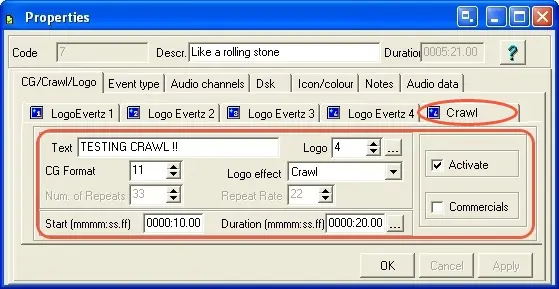
IdLogo - Logo number (e.g. 4).
LogoEffect - Logo effect (e.g.: lecrawl, lefixed, levariable, leoff, lescript).
Testo - Text to be shown (e.g.: TESTING CRAWL !!)
CRAWL_SPEE - Repeat rate
CRAWL_VOL - Number of repeats
CRAWL_IN - Not used
DSK3 - A fixed value that is composed by two characters which stands by:
Y/N - Activate DSK? Yes/No
Y/N - Is the logo a commercial? Yes/No
For example 'YN' will mean that the DSK will be activated for a not-commercial logo.
DSK3_DUR - Duration of the event in frames (e.g. 500).
DSK3_IN - SOM indicates the frames AFTER the start of the event (e.g. 250).
The aforementioned fields MUST be defined as shown in the example below:
<?xml version="1.0" encoding="UTF-8" standalone="yes"?>
<data datetime="2009-05-28 15:56">
<TPALINSE lastrevision="2009-05-28 15:56" description="Station=Channel 1 (Level=0) Date Exported=29/05/2009 User=1">
<row>
<COD_PROGRA>7</COD_PROGRA>
<DURATION>8025</DURATION>
<ID_FILMATI>7</ID_FILMATI>
<NEWTYPE>CLIP</NEWTYPE>
<DATA>29/05/2009</DATA>
<ORA></ORA>
<TITLE>Like a rolling stone</TITLE>
<TITLER>11</TITLER>
<CRAWL_DESC>[Crawl]
Testo=TESTING CRAWL !!
idLogo=4
LogoEffect=leCrawl
</CRAWL_DESC>
<CRAWL_SPEE>22</CRAWL_SPEE>
<CRAWL_VOL>33</CRAWL_VOL>
<CRAWL_IN></CRAWL_IN>
<DSK3>YN</DSK3>
<DSK3_IN>250</DSK3_IN> <DSK3_DUR>500</DSK3_DUR>
</row>
</TPALINSE>
</data>
result in:
Hmfile_hash_a1baccae
 5313_Hmfile_hash_a1baccae