57.1.3 Audio
AUDIO CHECKS
audio_checks
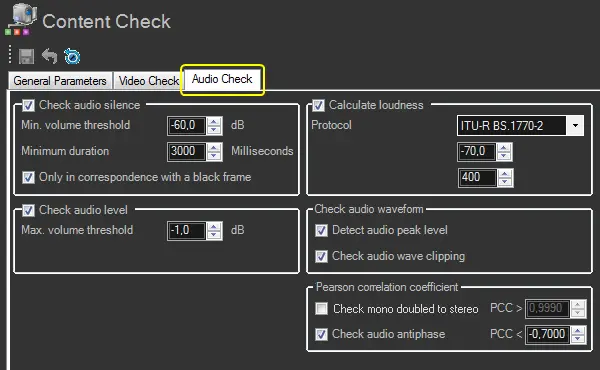
Audio silence
Check audio silence - If enabled, the content check process will detect "silent segments" (i.e. frames matching a certain audio silence level and a video black level).
Segments containing "silent audio signals" will be marked in the audio/video faults EDL. enabled (default)
Minimum volume threshold - Specify the minimum level (dB) below which an audio volume is considered "silence"; audio signals with a volume less than the value specified will be marked as defective. -60 (default)
Minimum duration - Define the minimum duration (millisecond) that a "low audio" issue must last to mark it as an "audio/video black". 3000 (default)
Only in correspondence with a black frame - If enabled, a video segment must match a black frame reference (besides a low audio level) to be considered "silent".
Audio level
Check audio level - The content check process will check for "noisy audio signals" and audio peak signals greater than the given maximum threshold if enabled.
Segments containing "noisy audio signals" will be marked in the audio/video faults EDL.
NB: Please note that the "Audio Level" check is not performed across individual channels; for that purpose, the "Audio Peak Sample" check should be used instead.
Maximum volume threshold - Specify the minimum level (dB) below which an audio volume is considered "noisy"; audio signals with a volume more significant than the specified will be marked as defective. -1.0 (default)
Audio loudness
Calculate loudness - The content check will also calculate the loudness value of the asset's linked media if enabled.
The measured "loudness" is stored in the "MAM > Loudness" asset metadata.
NB: The loudness calculation must be performed ONLY against media with a sample rate of 48 KHz; otherwise, the calculation won't be performed.
NB: The calculated loudness value of assets can be used to, for example, view the loudness statistics of events scheduled across television days or monitor the media loudness values through a dedicated loudness report. enabled (default)
Protocol
Specify the protocol to be used for the loudness measurement. Supported protocols are:
ITU-R BS.1770-1 - The loudness measurement will be based on the ITU-R BS.1770-1 algorithm, which calculates the audio loudness without using a relative gate (unlike the ITU-R BS.1770-2 revision, which supports gating).
ITU-R BS.1770-2 (EBU-R128) - The loudness measurement will be performed according to the EBU-R128 standard using the ITU-R BS.1770-2 algorithm, which calculates the audio loudness of all audio samples with a length more significant than a minimum sampling duration and a loudness greater than a minimum sampling threshold.
In the case of using this protocol, it will be possible to define the gating parameters: "min. gating threshold" and "gating samples duration".
NB: The ITU-R BS.1770-2 algorithm is an industry standard used when loudness compliance requires an "audio gating" that prevents reading at too low levels during the material with pauses or silences.
1770-2 (default)
Minimum gating threshold - Specify the minimum level (dB) for excluding audio samples; audio samples with a volume less than or equal to this threshold will be excluded from the calculation.
(ITU-R BS.1770-2 only)
NB: If the detected audio loudness is under the threshold, the loudness value written in the database will be -90.0 dB. -30.0 (default)
Gating samples duration (ITU-R BS.1770-2 only) - Define the minimum duration (ms) an audio sample must last to be included in the loudness calculation. Audio samples below this interval will be excluded from the calculation. 400 (default)
NB: To maintain a compact loudness and a better loudness analysis (e.g. detection of abrupt loudness variations between assets), Etere strongly suggests using a sample rate 48Khz (e.g. 192kbps, 48khz) when creating proxy files.
Audio waveform
Check audio waveform - If enabled, checks selected will be performed against audio waveforms.
enabled (default)
Detect audio peak sample - If enabled, determine the "maximum peak" by calculating their individual audio peaks across all channels.
The "maximum peak" is stored in the "MAM > AudioPeakLevel" asset metadata, whereas the frame in each peak is stored in "MAM > AudioPeakFrame". enable (default)
Check audio wave clipping - Count the times the audio waveform goes off the scale if enabled.
The result value is stored in the "MAM > AudioWaveClippingCount" asset metadata. enabled (default)
Pearson Correlation Coefficient
Check mono doubled to stereo - If enabled, the content check process will check if a stereo channel pair comprises one mono channel doubled to stereo.
Set a coefficient between -1 (completely different channels) and 1 (perfectly equal channels) against which values were detected for comparison. disabled (default) (0.9990)
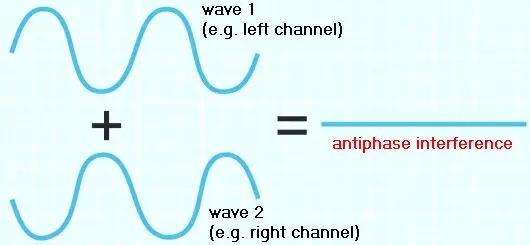
Check audio antiphase - If enabled, the content check process will check for "antiphase audio signals" to detect audio signals carrying two opposite channels that completely cancel each other.
interference
Set a coefficient between -1 (completely anti-phased signals) and 1 (perfectly in-phase signals) against which detected values will be compared and pointed out when an audio signal is lower.
Segments containing "anti-phased signals" are marked in the audio/video faults EDL. enabled (default) (-0.7000)
Please note:
•If the file has one audio track, it checks the channel of the track, which must be 1(mono), 2(stereo) or 5 (Dolby)
•If the file has two audio tracks in the channel, it checks the first two tracks (stereo).
 audio_checks
 interference