59.4.7.17 SFTP
Selecting the SFTP process type allows you to connect to an SFTP Server in DataMover to perform file upload/download using the SFTP protocol.
SFTP
Device and Codec
Source device and codec - Set the source device and select the codec from the list.
Destination device and codec - Set the destination device type and select the codec to be used.
Process type - Select SFTP as the process type for file transfer.
Process Settings
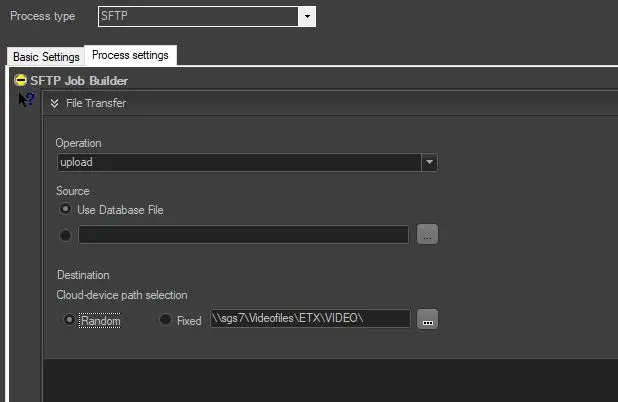
Operation - Select the operation type to perform, either Upload, Download or Delete.
Source - Select one of the options to retrieve the source file:
• Use Database file: Search the database to locate the file.
• Use the browse button to select a source file from the network drive.
Destination - Select one of the options for the metadevice path:
• Random: select this option to perform a random path selection among the available paths.
• Fixed: select this option and enter the pathname as a fixed destination path for the SFTP operation.
NB: During file transfer, the Copy action would exit if a block exists or the action does not fully copy the file. The user is advised to insert a "Retry” action in the workflow to ensure a successful file transfer.
 SFTP
SFTP