Manual Emergency Broadcasting
84.2.6.12 Video Assist - Using Custom Shortcuts
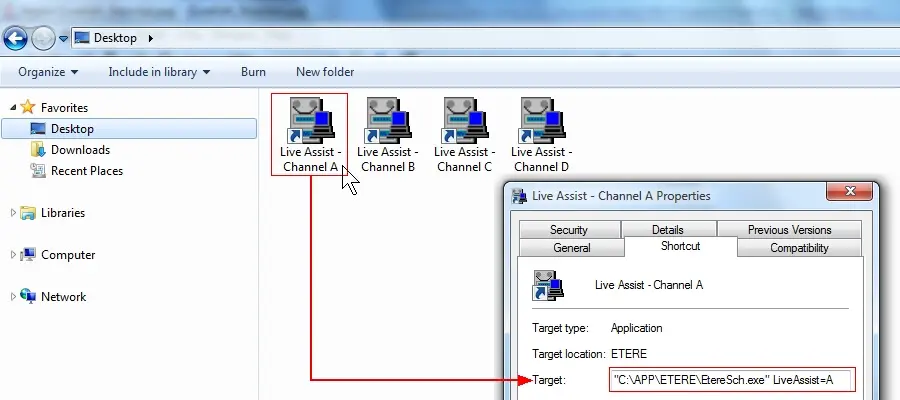
Custom shortcuts can be created to directly open using independent threads specific Video Assist instances (i.e. for specific channels), without clicking on the Executive Editor icon nor selecting the channel to be used.
In order to do this just modify the normal Etere Scheduling shortcut by appending to it the "liveassist=x" parameter, said parameter dictates the Video Assist channel to be open, it can be 1 (or A), 2 (or B), 3 (or C), 4 (or D):
5035_Custom_Shortcuts
"C:\Program Files (x86)\ETERE\EtereSch.exe" liveassist=3
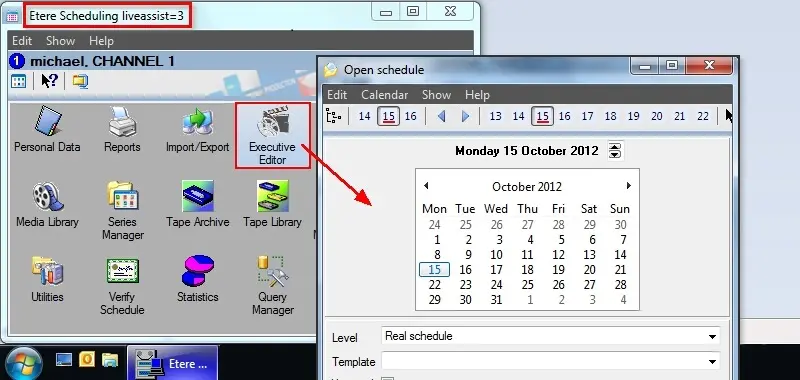
Once launched, the channel to which the launched instance is related will be displayed in the title bar of the window:
5036_Etere_Scheduling
 5035_Custom_Shortcuts
 5036_Etere_Scheduling