69.1.1.21 SAMSUNG2 EPG XML
Export scope
The export creates an XML file which contains the playlist data regarding one or more scheduling days.
Compared to the SAMSUNG EPG XML, this export will create a single xml file containing one or more days.
Assets data can be taken either from Flexi Metadata or from the Multilanguage.
1. The process checks the presence of the files in the destination folder
2. If the needed files are not there and they have to be delivered by workflow, the check will be repeated once the workflows are completed or when the maximum waiting time set in the parameters has been reached.
Export parameters
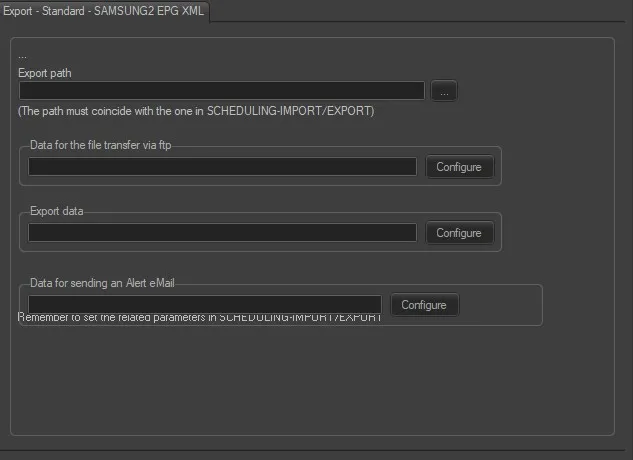
• Export path - Insert the path where to export the XML based file format.
• Data for the file transfer via ftp - Set the file transfer parameters to execute the transmission via ftp. See chapter 69.1.4.0 Configure Data File Transfer via FTP for more detailed information.
• Export data - Click on <Configure> to open the Configure Export window to specify the days to be exported and the frequency for the export.
• Data for sending an alert email - Enable the “Send email” option and configure the following parameters:
Host (SMTP server), Port: The dedicated SMTP server and its port number.
Username and password: User login name and password.
From: Sender's email address.
To: Recipient's email address.
CC: Recipient's email address in the CC list.
Once configured, use the <Test> button to send a dummy email to verify the parameters.
Scheduling related export
In order to make the export work, it's mandatory to set the parameters in Etere Scheduling > Import/Export > EXPORT\STANDARD\XMLTVSAMSUNG2 and SAVE the changes once done.
 standard_samsung2_epg_xml