69.2.2.7 MEDIASET PROMO
Import Scope
The F90 - MEDIASET PROMO function is used to automatically import an XML file containing all data of Mediaset assets, updating existing assets and creating new asset.
• In the XML file, the Parent asset of the importing assets is also managed in <CodProgPromosso> tag. If the child asset is not linked, it would be linked to the Parent asset. All assets not linked to Parent asset would be deleted.
• The Parent asset is searched in Asset Repository (FILMATI) table in database using the SQL “LIKE” operator, the first program asset in the “COD_PROGRA” field would be imported.
• When there are multiple imports in a day, the import would retain all assets linked to parent asset, and append the child assets to parent asset after each subsequent import.
• The value in the <AttenuazioneAudio> (or <AttenuationAudio>) tag (“S” (yes) / “N” (No)) would determine audio attenuation for the imported assets.
♦ If the value is set to “S” the 4th character of the value in <NewType> tag associated in the asset would be set to “0”, e.g. “XX00”.
♦ If the value is set to “N” the 4th character of the value in <NewType> tag associated in the asset would be set to “X”, e.g. “XX0X”.
♦ If <AttenuazioneAudio> tag is not present in the XML file, the value of “S” would take precedence.
♦ If <AudioFade> type property is set to “False” (by default), the <AttenuazioneAudio> rule would not applied.
NB: Please note that in order to work, the import function needs an SMPTE metadata named "Last DateTime Import Promo", ensure the said metadata exists in your system before import.
NB: When searching for the presence of asset code in database, the installation would not be taken into account in order to avoid creating duplicated assets in the presence of Disaster Recovery site.
Import Parameters
This import needs the following parameters to be configured:
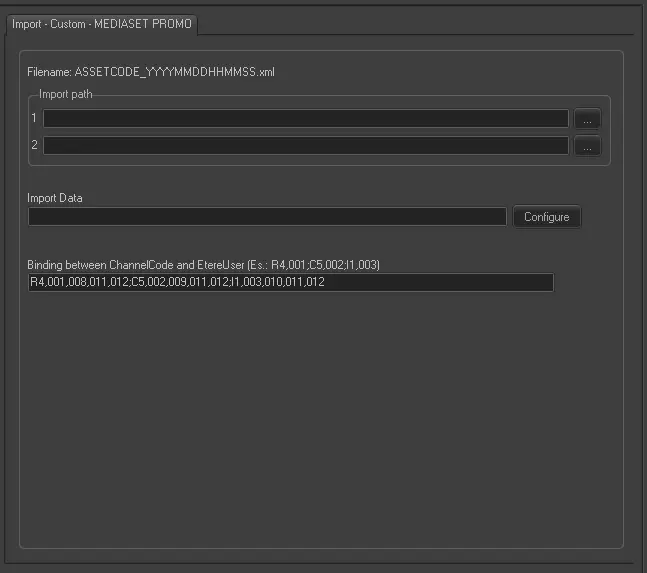
Import - Custom - MEDIASET PROMO
Filename - The name of the imported file must be as follows: AssetCode_YYYYMMDDhhmmss.xml (e.g. 324_20130118112455.xml).
Import path1 - Specify the first path (local or network) files to be imported are stored.
Import path2 - Specify the second path (local or network) files to be imported are stored.
Import data - Opens the Configure Import window to specify the days and the frequency to be imported.
Binding between ChannelCode and EtereUser - Imported files contains specifications regarding the station(s) the assets are assigned, therefore, this parameter must be set to allow linking a Mediaset channel (e.g. R4, C5, I1, etc) with an Etere station (e.g. 001, 002, 003, etc). The default configuration is:
R4,001,008,011,012; C5,002,009,011,012; I1,003,010,011,012
Once started, depending on whether imported assets exist in the system, Etere F90 would update existing assets and create new ones.
NB: Promo types of imported assets are linked to the ones set in "Etere Configuration > Settings > Types Editor > Types" (e.g. K -> XX01 , KS -> XS01)
Scheduling related import
This import doesn't require any configuration under the Etere Scheduling module.
Sample file to import
The file to be imported using this method must have the following structure in order to be correctly imported:
<?xml version="1.0" encoding="iso-8859-1"?>
<Title>
<Name>I1 - GRANDE FRATELLO VOLKSWAGEN SPONSOR 30" QSE</Name>
<CampaignId>240950</CampaignId>
<CampaignName>I1 - GRANDE FRATELLO </CampaignName>
<DepartmentCode>PI2</DepartmentCode>
<DepartmentName>ITALIA 1</DepartmentName>
<TargetId>212798</TargetId>
<TargetName>I1 - GRANDE FRATELLO VOLKSWAGEN SPONSOR</TargetName>
<TypeId>266056</TypeId>
<TypeName>I1 - GRANDE FRATELLO VOLKSWAGEN SPONSOR 30"</TypeName>
<TypologyCode>SC</TypologyCode>
<TypologyName>SPONSOR PROMO CEE</TypologyName>
<TimingId>392898</TimingId>
<TimingName>I1 - GRANDE FRATELLO VOLKSWAGEN SPONSOR 30" QSE</TimingName>
<StartDate>27/05/2019</StartDate>
<EndDate>06/12/2019</EndDate>
<StatusName>APPROVATO</StatusName>
<StatusDate>28/05/2019</StatusDate>
<UnitDuration>30</UnitDuration>
<Relativity>QSE</Relativity>
<DeliveryDate>29/05/2019</DeliveryDate>
<MediasetCode>FQSE2019009999I1</MediasetCode>
<Secondary>Primary</Secondary>
<PlacementChannelCode>I1</PlacementChannelCode>
<PlacementChannelName>ITALIA 1</PlacementChannelName>
<PictureFormat>None</PictureFormat>
<AudioFormat>None</AudioFormat>
<Notes></Notes>
<AttenuazioneAudio>S</AttenuazioneAudio>
<Bollino></Bollino>
<Sponsor>Si</Sponsor>
<SponsorDuration>8</SponsorDuration>
<SponsorPosition>C</SponsorPosition>
<PromoLive></PromoLive>
<Color></Color>
<Speaker></Speaker>
<CodProgPromosso>F3097616</CodProgPromosso>
<Channel>
<ChannelCode>I1</ChannelCode>
<ChannelName>ITALIA 1</ChannelName>
</Channel>
</Title>
 Import_-_Custom_-_MEDIASET_PROMO