59.5.4.111 Scheduling Costs
Report Description
The Scheduling Costs report allows to generate a report detailing the cost of scheduled assets (e.g. TV season, Documentaries, etc.), either taking their eventual set amortization templates (i.e. used to break down the cost of total runs into user-defined amortization percentages) or not.
NB: Please remember that amortization templates are configured in the Etere Air Sales > Amortization templates section and set either under the Asset Forms > Rights tab or the Season Orders > General tab section.
Report Filters
All the parameters that permit detailed report generation have been spread across seven different tabs to allow for a more straightforward configuration. By default, all filters are disabled (i.e., either blank or unselected); to enable them, it is enough to configure at least one parameter inside. Available filters include:
•Date range: Specify the period on which the selected order will be analyzed,
•Subject: Select the commercial order to which the report is related,
•Consider amortization tables: Indicate if amortization templates will influence the calculation of the unit prices.
Report Preview
The [Settings] permits configuring the page layout of the outgoing document; once filters and settings have been set, it will be possible to select between displaying a preview using the related [Preview] button or printing the document directly using the [Report] button. Please note that some reports permit the export of the generated document in the most common formats (pdf, CSV, doc, xls, XML, etc) just by using the [Export] button.
Scheduling_Costs
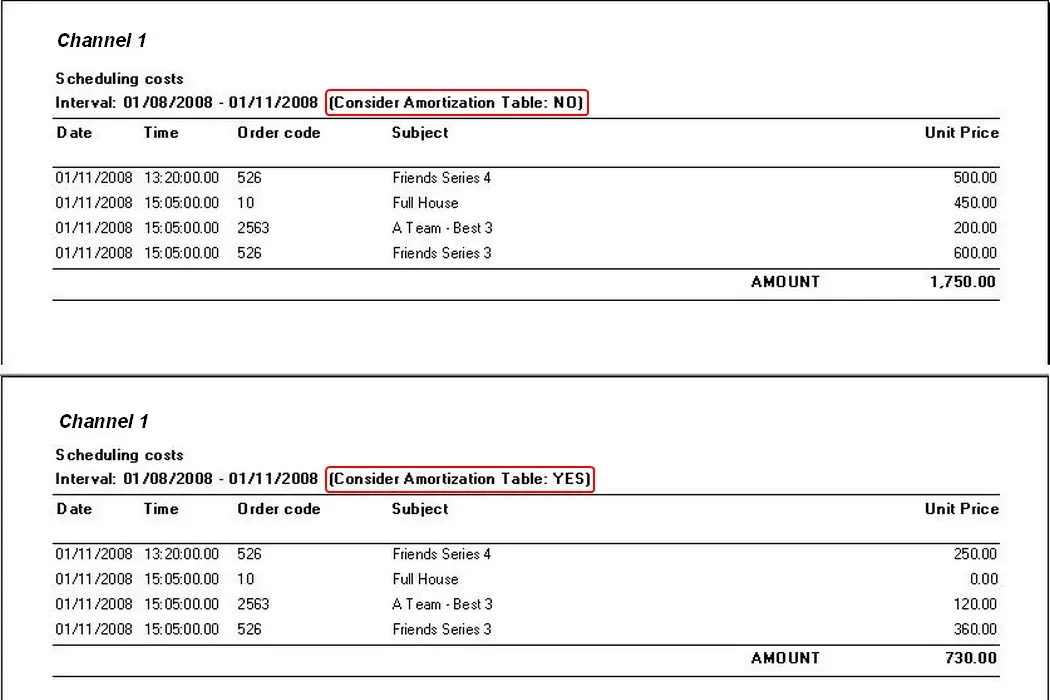 Scheduling_Costs