201.3.2 Season data
Once a television season has been either searched or created, it can be managed by handling the data made available across five function-specific tabs:
•General: Set the most relevant season information including title, season, country, duration, etc.
•Asset General Data: Detail various asset related data including the parental rate classification, video format and quality, season rights, etc,
•Tapeless: Indicate the person and the date which episodes will be delivered to the station via tapeless reception.
•Episodes: View and create the episodes that make up the season.
•Relationships: Define promotional assets for the whole season.
CHANGING THE TABS LAYOUT
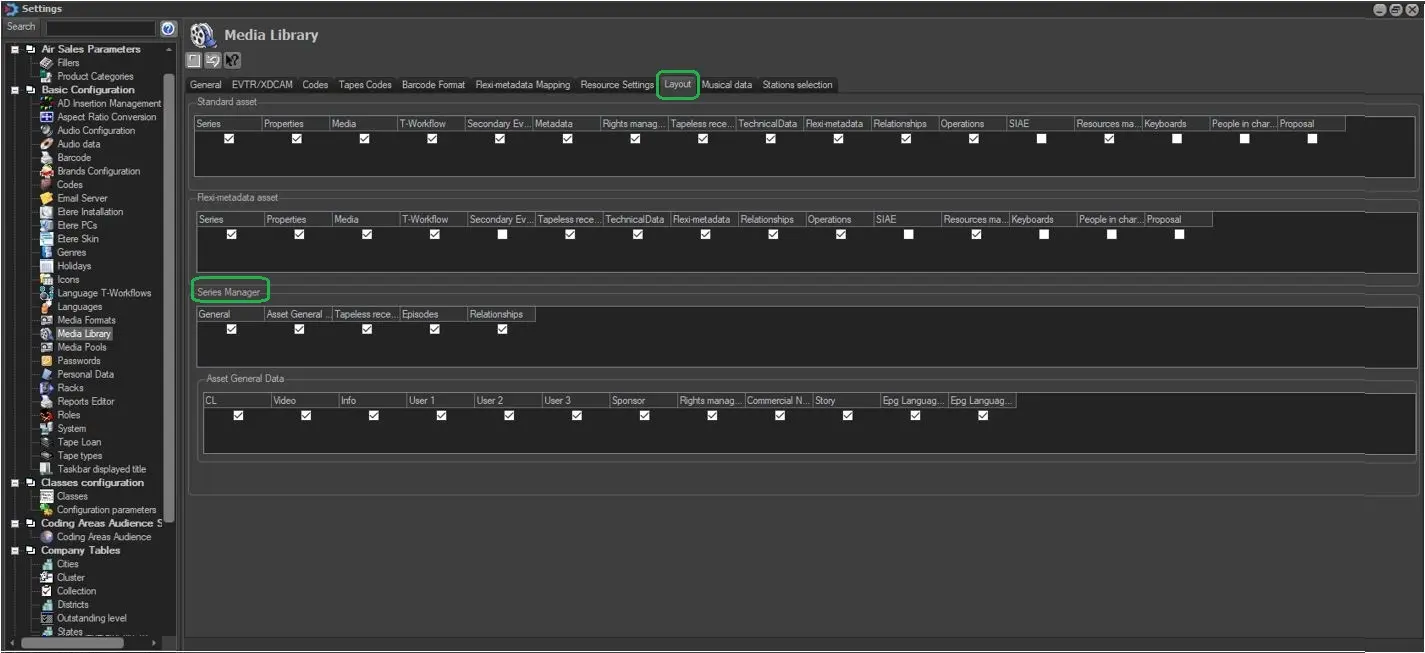
You can change the layout of the tabs above in the Season Manager. For instance, you can hide a tab that you do not required. In order to do this, follow the steps below.
1. Go to 'Settings' and select Media Library.
2. Click the 'Layout' tab. There will be a section titled 'Season Manager', simply check the respective boxes for the tabs that you wish to be shown or uncheck the boxes for the tabs that you wish to hide.
Series_manager_layout_config1
 Series_manager_layout_config1