Censoring video
58.3.13 Hide Effects
In CensorMX, you can hide certain video file footage displayed on the screen. This section describes the various effects applied to the video file.
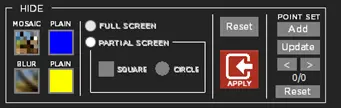
As shown in the screenshot below, the hide effects menu provides multiple combinations of effects tailored to your needs:
Censormx_hide_effects_new
From the menu, the hide effects available are:
- MOSAIC: this effect is made of small pieces of broken images in different colours and shapes to cover the footage effectively.
- BLUR: this effect makes a blurry video effect on the selected footage.
- PLAIN (blue): use this effect to cover the selected footage with a blue screen.
- PLAIN (yellow): use the effect to cover the selected footage with a yellow screen.
- Full Screen: apply the hide effect to cover the full screen of the video image.
- Partial Screen: apply the hide effect to cover parts of the video image. In addition, you can set the partial hide effect to be a shape of SQUARE or CIRCLE, and it can be FIXED at a certain position of the screen or a MOVE along in the screen.
Refer to the next section on applying the hide effect to cater to your environment.
 Censormx_hide_effects_new