72.19.5 Quality Check Features
There are various types of quality check features (parameters) offered to target respective device types. Features (parameters) listed below are categorized into video, audio, and both types, and the elements used by quality check module to analysis the device.
A.Video
1.Black Frame Detection
Black Frame Detection
A average pixel brightness is calculated by dividing the square sum of every pixel level in a frame by the pixel count. A lookout tabe is classifying the average brightness per pixel into a black level of 0...100, this allows to detect a black frame even there are some white pixel in the frame. The downside of this feature is that black frame with white text would be detected as black frame.
2.Freeze Frame Detection
Freeze Frame Detection
Every pixel is subtracted from the previous pixel, the average pixel freeze is calculated by dividing the total pixel freeze by pixel count. A lookup tabe is classifying the average freeze time per pixel into a freeze level from 0...100, this allows to detect a frame as freeze frame even there are some moving pixel in the frame.
3.Blocking Detection
Blocking Detection
The blocking artifacts are detected by analyzing the 8x8 block pattern in the picture. Several thresholds are used to detect if a block border is showing blocking artifacts. The downside is blocking only detect the "typical" MPEG-2 blocking coming from low bit rate encoding.
4.Blurring Detection
Blurring Detection
The blurring artifacts are detected by analyzing the 8x8 block pattern in the picture. Several thresholds are used to detect if a block border is showing blurring artifacts coming from the AVC / H.264 filtering process. The downside is the blurring algorithm can trigger false alarm when the frames are intended to be blurred.
5.Video Baseband Analysis
Video Baseband Analysis
This feature is used to detect minimum and maximum level of luminance and chrominance.
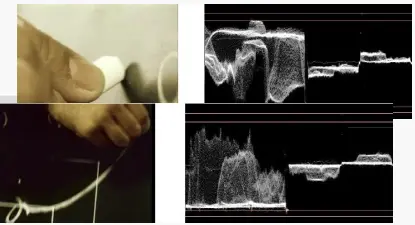
6.Brightness
Brightness
This feature give the average video level within a frame. The video level of every pixel is analyzed and used to calculate the average pixel level per frame. This feature simply collect statistic information, not detecting any error.
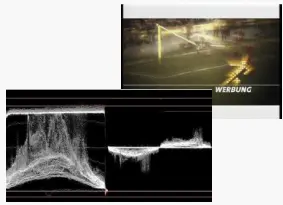
7.Contrast
Contrast
This feature analyze the maximum contrast within a frame. The highest and lowest pixel value is used to calculate the contrast. This feature simply collect statistic information, not detecting any error.
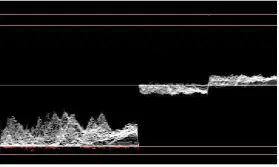
8.Super Black
Super Black
A lookout table is classifying the average brightness per pixel into a black level of 0...100, where 0 means lowest level. The video level of every pixel is analyzed and used to calculate to determine the value.
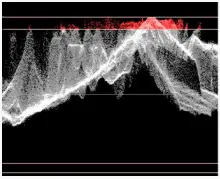
9.Luminance Headroom Violation
Luminance Headroom Violation
This parameter count the percentage of pixel having a video level above 100%. The video level of every pixel is used to calculate to determine the value.
A value of 10 means that 10% of the pixel are having a video level > 100%
10.Chrominance Headroom Violation
Chrominance Headroom Violation
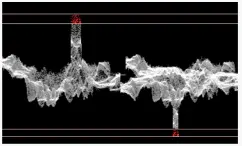
This parameter count the percentage of pixel violating the chrominance headroom. The chrominance level of every pixel is analyzed to determine this value.
A value of 10 means that 10% of the pixel are having a chrominance level > 105%.
11.Digital Betacam Error
Digital Betacam Error
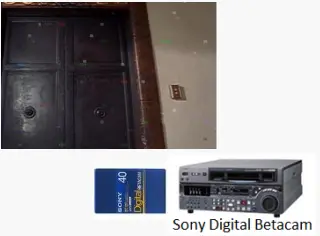
This feature detect artifacts produced from Sony Digital Betacam Tape Machines. The artifacts are known as "Channel Condition Error" or "Tape Hit Error" or "Head Clog Error".
The video is analyzed pixel by pixel to detect the errors.
The downside is the algorithm of this feature could not detect artifacts from other tape devices.
12.Digital Dropouts
Digital Dropouts
This parameter detects color dropouts in the decoded picture. One possible source is channel condition error produced by Panasonic DVC PRO Tape machine. Other possible causes includes bit error in files, error in encoding, etc. The picture is analysed pixel by pixel to determine the error. The downside is the algorithm would detect a good picture content as dropouts.
13.Single Luminance Line Error
Single Luminance Line Error
This parameter detect single luminance line error in frame. The picture is analysed line by line to determine the defect. This feature detect only single line error.
14.Single Chrominance Line Error
Single Chrominance Line Error
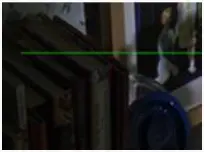
This parameter detect single chrominance line error in frame. The picture is analysed line by line to determine the defect. This feature detect only single line error.
15.Interlacing Artifacts
Interlacing Artifacts
This feature detects interlacing artifacts as shown above. The picture is analyzed line by line to determine such error.
16.Flash / Strobe Error
Flash - Strobe Error
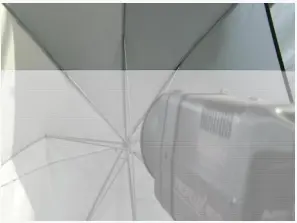
This feature detect flash lights and / or strobe errors. The stream is analysed frame by frame to determine the error.
17.Field Dominance Error
Field Dominance Error
Field dominance refer to choice of field of an interlacing video signal where the video editing occurred. In a sequence of Top and Bottom fields T B T B T B T B, there are two possible choices:
• T B T B |edit point| T B T B
• B T B T |edit point| B T B T
Image above illustrate that results of wrong field dominance.
18.Temporal Complexity
High complexity changes referred to the high level of changes made between previous frame and current frame, e.g. change color from black to white, or vice versa. Low complexity changes referred to low level change made between previous frame and current frame, e.g. freeze a frame. This feature help to detect scene cuts which usually resulted from high complexity change.
19.Dead Pixel Detection
Dead Pixel Detection
A dead pixel is coming from a CCD chip camera that has a "broken" pixel element, this element contain no information.
Depending on the compression method, a high compression "smearing" the dead pixel around neighbor pixels would make it more difficult to detect the error.
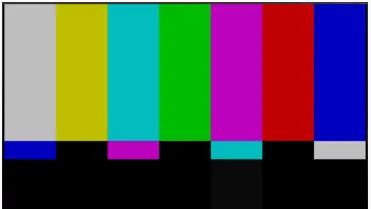
20.Test Pattern Detection
Test Pattern Detection
This feature detect standard color bar at 75% and 100% video level
21.Constant Color Frame
Constant Color Frame
This feature detect the percentage of the pixel in image that present constant color.
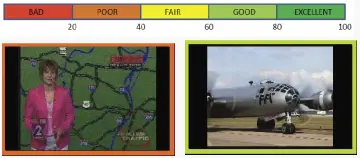
22. Video Quality Index
Video Quality Index
This parameter detect the encoded video quality. The algorithm analysis video quality based on detecting encoding artifacts such as blocking, blurring, picture codinh types, bitrate, etc. The downside is the feature was developed for H.264 and MPEG encoder, it could give false positive results for picture content created by other codecs.
B.Audio
1.Audio Peak Level
This parameter detect a full scale audio level. The audio frame by can be set by user using the following formula:
vu=cur_vu_level / max_level
audio_level = 20* log10(vu)
2.No Audio
This feature detect if there is any "no audio" data encoded in a audio frame.
- 0: there are audio samples encoded in the audio frame
- 1: there are "no audio" samples encoded in the audio frame
3.Mute
This feature detect if there is "audio mute" in a audio frame by using the formula below:
vu=cur_level / Max_level
audio_level=20* log10(vu)
•MAX_LEVEL = max. possible Amplitude / sqrt (2)
• To indicate a clear Mute Level in the graph, set the Audio Level to -54 dBFS in case of Mute (even when
the actual audio_level is smaller !)
4.Clipping
This parameter detect clipping within a audio frame. Clipping is signaled when the audio level is larger than -1 dBFS.
5.Sample Clipping
This Parameter is signaling Clipping of an audio sample. Whereas “normal” clipping is based on the whole Audio frame, the Sample clipping refers to clipping of a single sample within a Audio Frame.
6.Audio Loudness Measurement
It analysis loudness accordingly to EBU R128 standard. (European Broadcasting Union Recommendation R128 of August 2011 is a set of rules regarding loudness normalisation and permitted maximum level of audio signals during broadcast.)
C.Video and Audio
1.Field Order Detection
This feature detect the "real" field order within a sequence, it analyse the frame movement within a sequence and determine the correct order, error can be detected by comparing the measured field order with requested field order. Depending on the content in the picture, the analysed results could be false positive.
2.Stream Syntax Error
D.Parameters Guideline
Listed below are the guideline for parameter value to carry out quality check on media device.
Feature / Parameter - Picture Coding Type
Min. Value : 1
Max. Value : 5
Feature / Parameter - Is Key Frame
Min. Value : 0
Max. Value : 1
Feature / Parameter - Bytes per frame
Min. Value : 0
Max. Value : 300000000
Feature / Parameter - Frame address
Min. Value : 0
Max. Value : 300000000
Feature / Parameter - Black
Min. Value : 0
Max. Value : 100
Feature / Parameter - Freeze
Min. Value : 0
Max. Value : 100
Feature / Parameter - Blocking Artifacts
Min. Value : 0
Max. Value : 100
Feature / Parameter - Blurring
Min. Value : 0
Max. Value : 100
Feature / Parameter - Digital beta error
Min. Value : 0
Max. Value : 100
Feature / Parameter - DV error
Min. Value : 0
Max. Value : 100
Feature / Parameter - Luminance line error
Min. Value : 0
Max. Value : 100
Feature / Parameter - Chrominance line error
Min. Value : 0
Max. Value : 100
Feature / Parameter - Max. video level in frame
Min. Value : -7
Max. Value : 110
Feature / Parameter - Min. video level in frame
Min. Value : -7
Max. Value : 110
Feature / Parameter - Frame quality level
Min. Value : 0
Max. Value : 100
Feature / Parameter - Interlace artifacts
Min. Value : 0
Max. Value : 100
Feature / Parameter - Average picture brightness
Min. Value : 0
Max. Value : 100
Feature / Parameter - Picture contrast
Min. Value : 0
Max. Value : 100
Feature / Parameter - Super black
Min. Value : 0
Max. Value : 100
Feature / Parameter - Super white
Min. Value : 0
Max. Value : 100
Feature / Parameter - Super chroma
Min. Value : 0
Max. Value : 100
Feature / Parameter - Field order
Min. Value : -50
Max. Value : 50
Feature / Parameter - Strobe error
Min. Value : 0
Max. Value : 100
Feature / Parameter - Temporal complexity
Min. Value : 0
Max. Value : 1
Feature / Parameter - Audio peak level
Min. Value : 0
Max. Value : 100
Feature / Parameter - Audio mute
Min. Value : 0
Max. Value : 1
Feature / Parameter - No audio
Min. Value : 0
Max. Value : 1
Feature / Parameter - Audio frame clipping
Min. Value : 0
Max. Value : 1
Feature / Parameter - Audio single sample clipping
Min. Value : 0
Max. Value : 1
Feature / Parameter - Chroma level
Min. Value : 0
Max. Value : 115
Feature / Parameter - Field dominance error
Min. Value : 0
Max. Value : 100
 Blocking_Detection
 Contrast
 Video_Baseband_Analysis
 Brightness
 Super_Black
 Blurring_Detection
 Freeze_Frame_Detection
 Black_Frame_Detection
 Luminance_Headroom_Violation
 Digital_Dropouts
 Flash_-_Strobe_Error
 Single_Chrominance_Line_Error
 Interlacing_Artifacts
 Single_Luminance_Line_Error
 Chrominance_Headroom_Violation
 Digital_Betacam_Error
 Video_Quality_Index
 Constant_Color_Frame
 Test_Pattern_Detection
 Field_Dominance_Error
 Dead_Pixel_Detection