Media Asset Management
59.2.43.18 Exporting & Importing Nodes
Exporting nodes
The export of all flexi-metadata has been extended to all nodes. To export into an XML file, right-click on the node and select the "Export from XML" function:
- Worldwide node
Worldwide_node
- Local node
Local_node
Importing nodes
The structure of a certain metadata node previously exported into an XML file can be imported by right-clicking on the node and selecting the "Import from XML" function:
Import_from_XML
NB: Please note that only a worldwide node allows importing a structure.
Flexi-metadata mapping
Mapping Flexi-metadata to specific Etere fields is possible under the Flexi-metadata Mapping section. Mapping is helpful to keep Etere metadata updated each time a particular Flexi metadata is updated and vice versa.
See Chapter 59.2.17.0 Flexi-metadata Mapping for more information.
See Chapter 59.2.17.0 Flexi-metadata Mapping for more information.
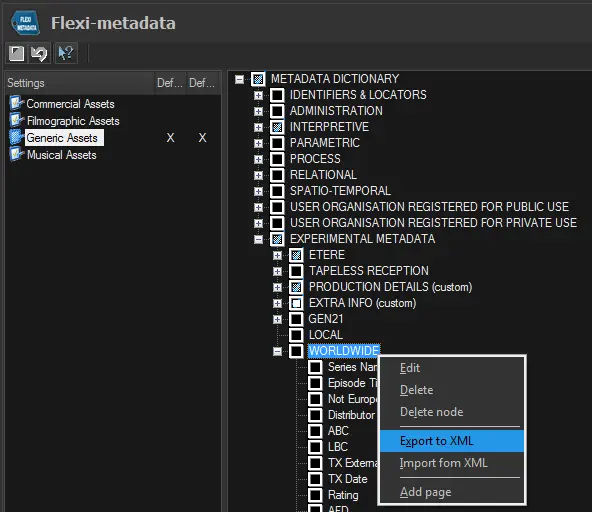 Worldwide_node
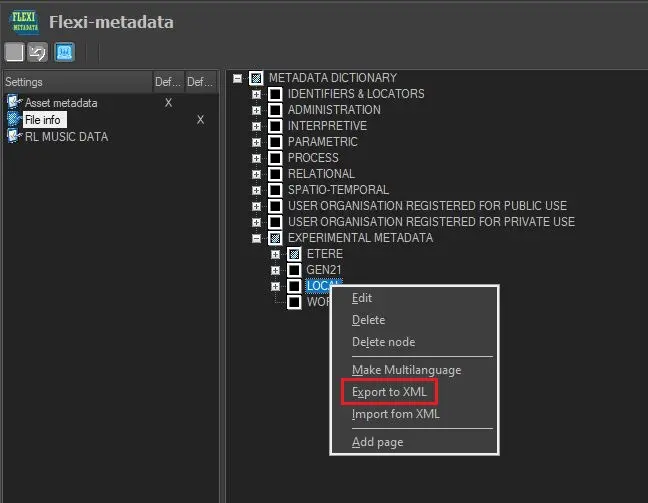 Local_node
 Import_from_XML