85.2.20.1 Configuration
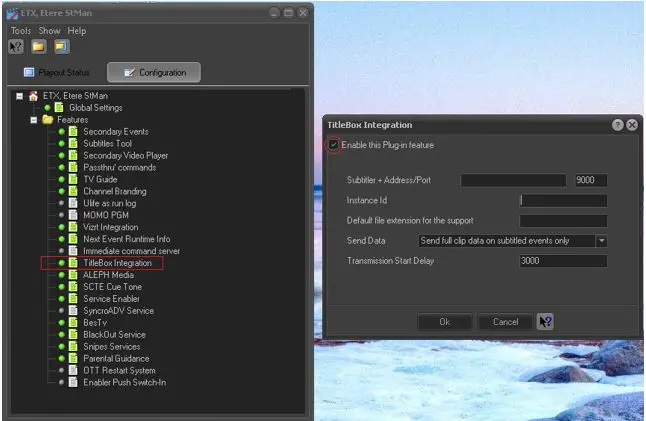
Launch Etere STMan, click on “TitleBox Integration” to open the dialog box. You would need to check <Enable this plug-in feature> to begin the configuration.
Configuration Parameters:
Subtitler+ Address / Port: Specify a valid IP address and port number to receive the subtitles. The default port number is 9000. If the IP address is left blank, the subtitles would be sent to broadcasting address (ff,ff,ff,ff).
Instance ID: The channel ID used for the playout. It is used by subtitler+ to select the correct subtitles stream.
Default file extension for the support: No file extension is required for support, a default file extension would be append to the file name of the file sent to subtitler+.
Send Data: Select one of the option from the list
oSend full clip data, always: Always send the full clip data, even when the event has no subtitle.
oSend full clip data on subtitled events only: Send full clip data only when event is subtitled, empty the placeholder data if the event is not subtitled.
oSend data only when asset is subtitled: Send full clip data only when event is subtitled, else no data would be sent.
Transmission Start Delay: Set the start offset time for data transmission. The recommended value is 3000 millisecond, setting a lower value might cause a few frame to be out of sync.
TitleBox Integration
 TitleBox_Integration