70.3.2.2 Servers
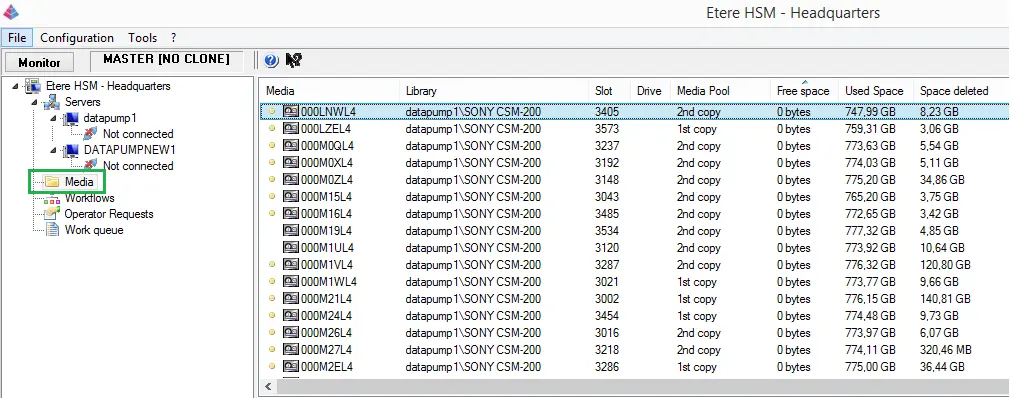
The Servers section contains all tape libraries set to be managed by Etere Headquarters, independently if they are either online or offline. The simple user interface of this area allows performing the following operations:
Etere HSM - Headquarters
NB: Under the Servers node, only active servers should be added. Any obsolete server or “Not connected” servers should be removed.
Main functions
The contextual menu accessed by making right-click on the "Servers" node includes the following functions:
•Add...: A detailed procedure on how to add a robotics server to the Headquarters management is explained in the "Adding a server" chapter.
Library functions
The right-click menu available for a selected "robotics server" includes the following functions:
•Remove: It removes the selected "robotics server" from the servers list. In order to re-insert a removed server just use the "Add..." function.
Drive functions
Making right-click on a tape library (e.g. IBM 3573) and then on a certain tape drive (e.g.:1), it will be possible to perform the following actions:
•Properties: It shows the library on which the drive is contained, allowing also to view and modify the drive's media format and access time.
•Inject into library: Use it to insert a tape into the selected drive in order to load the tape.
NB: Available media types are configured in the Etere Configuration > Settings > Media Formats module. When using multiple media formats for archive or restore operations, e.g. connect LTO 5 tape module to LTO 6 drive in Tape Library, both media formats in Media Formats settings must be enabled.
Tape functions
The right area of the "Servers" section displays all the tapes available into a certain library/drive, allowing -through a right-click- to access the functions below:
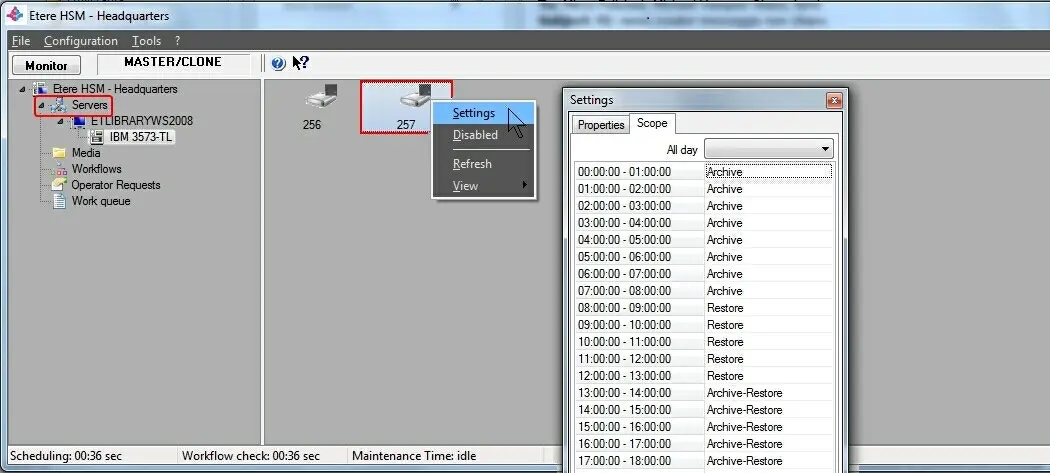
•Settings: Set the operation "scopes" to be performed on the drive. The operation to be performed by the tape drive must be identified, the function can be Archive, Restore, or BOTH.
Settings
NB: Please note that if you had change the scope to be performed by Data Pump (e.g. from Archive to Restore, or vice versa) the changes would only take effect on new jobs, all queued jobs submitted before the change of scope would remain in the Work Queue.
•Enabled/disabled: Set the drive as either enabled or disabled. If there are jobs that assigned to the disabled drive, you must abort each job in the work queue and relaunch T-workflow to assign the jobs to be scheduled to another drive.
 Etere_HSM_-_Headquarters
 hsm_server01