69.2.2.8 MEDIASET PUBLITALIA ANAG.
Import Scope
The F90 - MEDIASET PUBLITALIA ANAG. import allows importing a .ZIP file containing multiple .XML files related to assets coming to Mediaset from Publitalia. During the import, XML files are extracted into a temporary directory where they would be imported and then deleted from the directory.
It's worth mentioning that imported types must be linked to Etere types under "Etere Configuration > Settings > Types > Export Mediaset" (e.g. SPOT -> SP00 , etc.). If an imported type is not linked to an Etere type, an error message will be displayed and the import process will be interrupted.
Regarding assets, if an imported asset doesn't exist in Etere it would be created, otherwise, it would be updated. Moreover, some data is imported in the Etere's SMPTE metadata, therefore, the following metadata must be created in the system under the "Etere Configuration > Settings > MAM > SMPTE Metadata" section:
Metadata: PUBLITALIA-Last DateTime Import
Type: datetime
Metadata: PUBLITALIA-Codice Settore
Type: string
Metadata: PUBLITALIA-Descrizione Settore
Type: string
Metadata: PUBLITALIA-Codice Classe
Type: string
Metadata: PUBLITALIA-Descrizione Classe
Type: string
Metadata: PUBLITALIA-Is Codice Material Cornice
Type: string
Metadata: PUBLITALIA-Is Codice Material Spot
Type: string
Metadata: PUBLITALIA-Is Effect Picture Frame
Type: string
Metadata: PUBLITALIA-Status
Type: string
Metadata: PUBLITALIA-DataStatus
Type: datetime
The import criteria includes the following:
• If the zip package contains one or more damaged files, it would be renamed into "Materiali_INCR_YYYYMMDDHHMMSS_ERR.zip" to prevent re-processing in the following import cycle.
• The aspect ratio is part of the XML file name, e.g. S31098_1551905_34266_169_20180411111745_C.XML, however, the import process make reference to the values specified in the <CODICE_FORMATO> tag in XML file and import the aspect for the assets. The available aspect values are “HD”, “16:9” and “4:3”. Refer to the sample file below.
• In the process of importing, the <CODICE_FORMATO> tag would be filled with “PNG” format, this format is exclusive to the EN (Enabler) type to determine the NEWTYPE of asset. No error message would be recorded for the unrecognized video format. At the end of import, the <CODICE_FORMATO> tag would be filled with aspect “16:9” without making control over the asset type.
• If the value in tag <IS_FLAG_CARTELLO> is not equal to ‘S’, the duration in the tag <CODICE_TIPOLOGIA_MATERIALE> is imported as ‘0’ (zero) for code type 'IS', 'CO', 'EN' or 'SPOT'. If the value in tag <IS_FLAG_CARTELLO> is equal to ‘S’, the tag <CODICE_TIPOLOGIA_MATERIALE> for code type 'IS', 'CO', 'EN' or 'SPOT' would reflect the expected duration.
• The import would update the data field “SPONS_DUR” only if the asset is not registered.
• If the asset contain “Quote Live” secondary events, the events would be scheduled as defined in the Schedule Parameters settings.
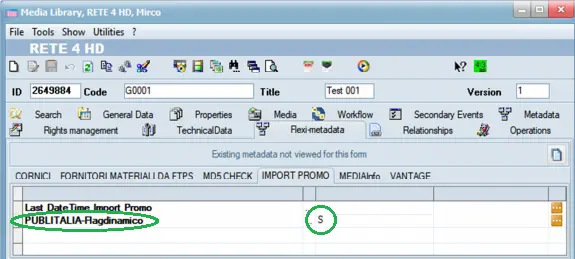
• The tag <FLAGDYNAMIC> would be imported in the flexi-metadata as "string" type field “PUBLITALIA-Flagdinamico” containing the value “S” or “N” in the asset form.
PUBLITALIA-Flagdinamico
• During import, the product status is managed. If the product status is “DELETED” or “BLOCKED” the status would be updated to “FILMATI.NONTRASMISSIBILE” field in Asset Repository database table as well as in the following flexi-metadata fields in asset:
PUBLITALIA-Status: Product status (e.g. "DELETED", "BLOCKED")
PUBLITALIA-DataStatus: Date / time of the last changes made to product status.
When the assets status are updated as “DELETED” or “BLOCKED” in the <OPERAZIONE> tag, no further operation or T-workflow can be performed on these assets.
NB: When searching for the presence of asset code in database, the installation would not be taken into account in order to avoid creating duplicated assets in the presence of Disaster Recovery site.
Import Parameters
This import needs the following parameters to be configured:
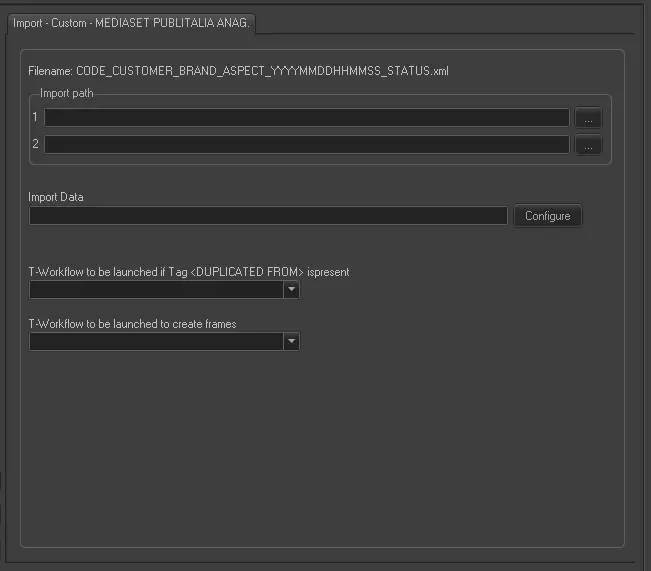
Import - Custom - MEDIASET PUBLITALIA ANAG.
Moreover, the name of XML files must be: Code_Customer_Brand_Aspect_YYYYMMDDHHMMSS_Status.xml
Import path - Specify the two paths from which files will be imported.
Import data - Opens the Configure Import window to specify the days and the frequency to be imported.
T-Workflow to be launched if Tag <DUPLICATED FROM> is present - During import, when the <DUPLICATED FROM> tag (<DUPLICATO_DA>) in the XML file is evaluated, the T-workflow action specified in this parameter would be triggered.
T-Workflow to be launched to create frames - This parameter managed the following tags in the XML file:
<IS_CODICE_MATERIALE_CORNICE>
<IS_CODICE_MATERIALE_SPOT>
When both tags are evaluated, specify the name of the T-workflow action to be launched and start creation of the frames.
Scheduling related import
This import doesn't require any configuration under the Etere Scheduling module.
Sample file to import
The file to be imported using this method would have the following structure in order to be correctly imported:
<?xml version="1.0" encoding="ISO-8859-1"?>
<MATERIALE>
<OPERAZIONE>CREATE</OPERAZIONE>
<CODICE_TIPOLOGIA_MATERIALE>SPOT</CODICE_TIPOLOGIA_MATERIALE>
<CODICE_MATERIALE>P0481</CODICE_MATERIALE>
<CODICE_CLIENTE>1543557</CODICE_CLIENTE>
<DESCRIZIONE_CLIENTE>BAULI S.P.A.</DESCRIZIONE_CLIENTE>
<CODICE_MARCA>445</CODICE_MARCA>
<DESCRIZIONE_MARCA>BUONDI' CLASSICO</DESCRIZIONE_MARCA>
<SOGGETTO>BUONDI' MOTTA</SOGGETTO>
<DURATA_MATERIALE>15</DURATA_MATERIALE>
<CODICE_FORMATO>16:9</CODICE_FORMATO>
<IS_FLAG_CARTELLO/>
<IS_DURATA_CARTELLO>0</IS_DURATA_CARTELLO>
<IS_CODICE_TIPOLOGIA_SPONSOR/>
<IS_DESCRIZIONETIPOLOGIASPONSOR/>
<IS_CODICE_SETTORE>03</IS_CODICE_SETTORE>
<IS_DESCRIZIONE_SETTORE>ALIMENTARI</IS_DESCRIZIONE_SETTORE>
<CODICE_CLASSE>10532</CODICE_CLASSE>
<DESCRIZIONE_CLASSE>PRODOTTI FORNO/CEREA</DESCRIZIONE_CLASSE>
<TAB_STATO_FILMATO>1</TAB_STATO_FILMATO>
<TAB_CODICE_BLOCCO/>
<TAB_DATA_PARTENZA>20160904</TAB_DATA_PARTENZA>
<TAB_DATA_FINE_DIRITTI/>
<TAB_CODICEMATERIALESOSTITUENTE/>
<TAB_FLAG_FILMATO_BLOCCATO>N</TAB_FLAG_FILMATO_BLOCCATO>
<DUPLICATO_DA/>
<FLAGDINAMICO>N</FLAGDINAMICO>
<IS_SCARICO_MAM>N</IS_SCARICO_MAM>
<IS_CODICE_MATERIALE_CORNICE/>
<IS_CODICE_MATERIALE_SPOT/>
<IS_EFFETTO_PICTURE_FRAME/>
<CODICE_CASAPRODUZIONE>00651</CODICE_CASAPRODUZIONE>
<DESCRIZIONE_CASAPRODUZIONE>MIRACLE</DESCRIZIONE_CASAPRODUZIONE>
</MATERIALE>
 PUBLITALIA-Flagdinamico
 Import_-_Custom_-_MEDIASET_PUBLITALIA_ANAG.