54.5.3.1 Replacement
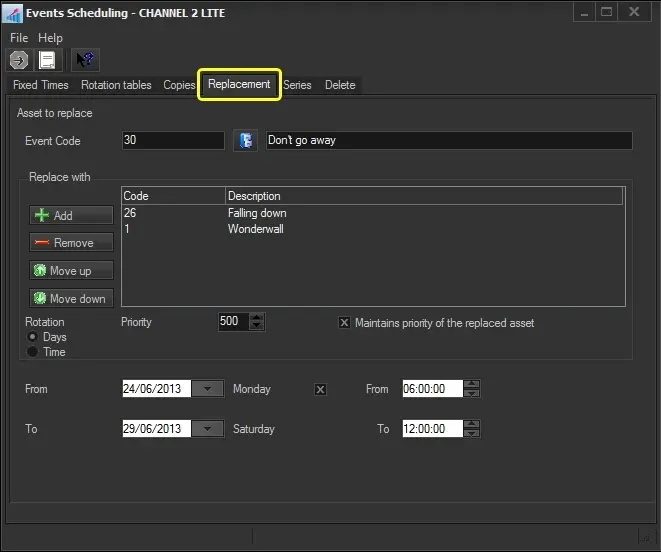
The Replacement function allows you to replace or rotate an already-scheduled asset with another schedule, maintaining the expected schedule times unaltered. To start replacing an event, search for it using the [TraLit_eventSchedule_SEARCH Event Code] button and then compile the following parameters:
Replacement_1
Parameter - Event Code
Description: Search for the asset to be replaced.
Parameter - Replace with
Description: Search for the asset(s) to replace the previous asset.
Use the [add] and [remove] buttons to select and deselect events and the [move up] and [move down] buttons to arrange them in the list.
Parameter - Rotation
Description: Indicate if the rotation method with which the asset will be replaced:
Days - Replacement assets will be inserted one per day on rotation bases and alternated daily, one per day. For instance:
Slot 1
Day 1: asset-A
Day 2: asset-B
Day 3: asset-C
Day 4; asset-A
Slot 2
Day 1: asset-A
Day 2: asset-B
Day 3: asset-C
Day 4; asset-A
Slot 3
Day 1: asset-A
Day 2: asset-B
Day 3: asset-C
Day 4; asset-A
Slot 4
Day 1: asset-A
Day 2: asset-B
Day 3: asset-C
Day 4; asset-A
Time - Replacement assets will be inserted one per time slot in rotation bases; they will be alternated every day, one per time slot. For instance:
Slot 1
Day 1: asset-A
Day 2: asset-A
Day 3; asset-A
Day 4; asset-A
Slot 2
Day 1: asset-B
Day 2: asset-B
Day 3: asset-B
Day 4; asset-B
Slot 3
Day 1: asset-C
Day 2: asset-C
Day 3: asset-C
Day 4; asset-C
Slot 4
Day 1: asset-A
Day 2: asset-A
Day 3: asset-A
Day 4; asset-A
Parameter - Priority
Description: Specify the priority with which the event will be scheduled. An event's priority is the criteria Etere uses to determine its position within a commercial cluster during the scheduling phase. This priority starts from 1 (highest) to 1000 (lowest).
Parameter - Maintains priority of replaced asset.
Description: If enabled, the new asset will keep the priority of the replaced asset.
If disabled, new assets will be inserted with their specified priority.
Parameter - From - to (dates)
Description: Insert the dates range in which the asset will be replaced. By default, the order's start & end dates will be proposed.
Parameter - From - to (times)
Description: Optionally, specify the period when the asset will be replaced. By default, the order's start & end times will be proposed.
Once all parameters have been set, press the [RUN] button to replace the scheduled asset.
 Replacement_1