69.2.1.21 XML Asset XSLT
Import Scope
The F90 - XSLT Asset Full import allows to import standardized XML files containing the information related to assets of the specified day(s).
Import Parameters
The parameters required are described below:
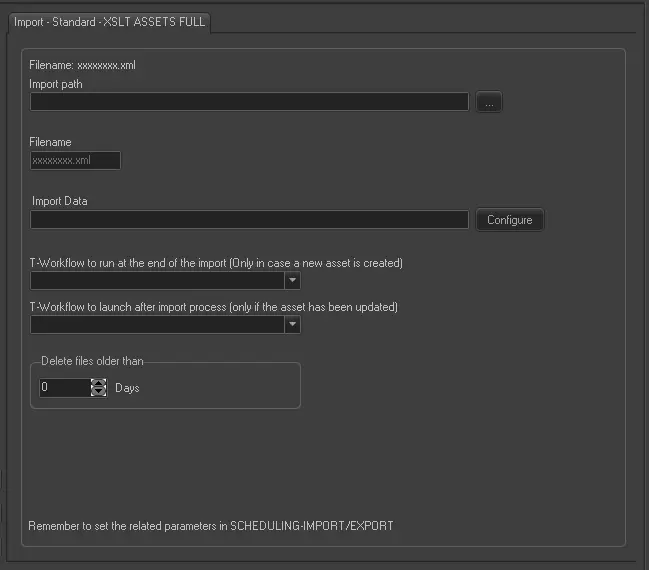
Import - Standard - XML Asset XSLT
Import path - Specify the path and directory where the XML file is stored.
Filename - Enter the file name of the XML file resided in the import path.
Import Data - Opens the Configure Import window to specify the days and the frequency to be imported.
T-workflow to run at the end of the import (only in case a new asset is created) - Select the name of the T-workflow to be automatically launched after the import has completed, in the event if new asset is created during import.
T-workflow to run at the end of the import (only in case of update asset) - Select the name of the T-workflow to be automatically launched after the import has completed, in the event if assets are updated during import.
Delete files older than - Enter the number of days to retain the processed XML files in database. Processed XML files that reside in database for more days than the number specified in this parameter, will be deleted from the database. Processed files are files with extension *.err* and *.old*.
The process imports all files with extension .xml in the directory. If the import is successful, the import files will be renamed to *.old001, *.old002, and so on. If import fails, the import files will be renamed to *.err001, *.err002, etc.
Scheduling related import
Set the same parameters in the Etere Scheduling > Import/Export > IMPORT\STANDARD\GENERIC\XMLASSETSFULLFORXSLT and SAVE the changes once done.
 Import_-_Standard_-_XML_Asset_XSLT