59.3.9.72 Replace scheduled event
Action Description
The "Replace scheduled event" action allows the T-workflow attached asset to automatically replace an asset's scheduled performances matching the given criteria with a new asset (e.g., meeting the station's censorship requirements).
The T-workflow, including a replacement action, must be launched from the replacement asset, the one to be used for replacement. It's worth mentioning that scheduled performances of an asset are replaced ONLY from the workflow execution time onwards, thus maintaining unaltered all transmitted expected events in the past.
NB: If the replaced event is derived from a sales proposal, a new line will be added to the proposal log indicating the operation's name, description, date, user and related application.
Action Parameters
Under this section, it is possible to create new actions based on the following parameters:
General info
Name - Give a brief and self-descriptive name to the action (e.g. "Replace season Episodes by Flexi-metadata Description").
Asset to replace - Indicate here the method to determine the asset to be replaced:
First version - Replace the first version of the asset. This option is useful to replace the first version of an asset, for example, with a new edited/uncensored version (to which the T-workflow is attached).
By Flexi-metadata - Replace the asset whose ID or CODE matches the specific metadata of the replacement asset (i.e. T-workflow attached asset) according to the type of selected metadata:
•Integer: If the selected metadata is an integer, the asset to be replaced will be an ID that matches the metadata.
•String: If the selected metadata is a string, the asset to be replaced will be the one whose CODE matches the metadata.
If assets have been expanded - Dictate here the action to be taken in case the replacing asset has been expanded in the schedule (i.e. divided into parts):
•Skip event: No replacement will be performed if the replacing event has expanded.
•Replace event and keep existing segments: The replacement event will be expanded in the same number of parts (e.g. 3) as the replacing one.
•Replace event and expand default EDL: The replacement event will be expanded according to its default EDL version (usually the number 1).
•Replace event and expand same EDL version: The T-workflow attached asset will be expanded according to the same EDL version of the replacing one.
How to use it
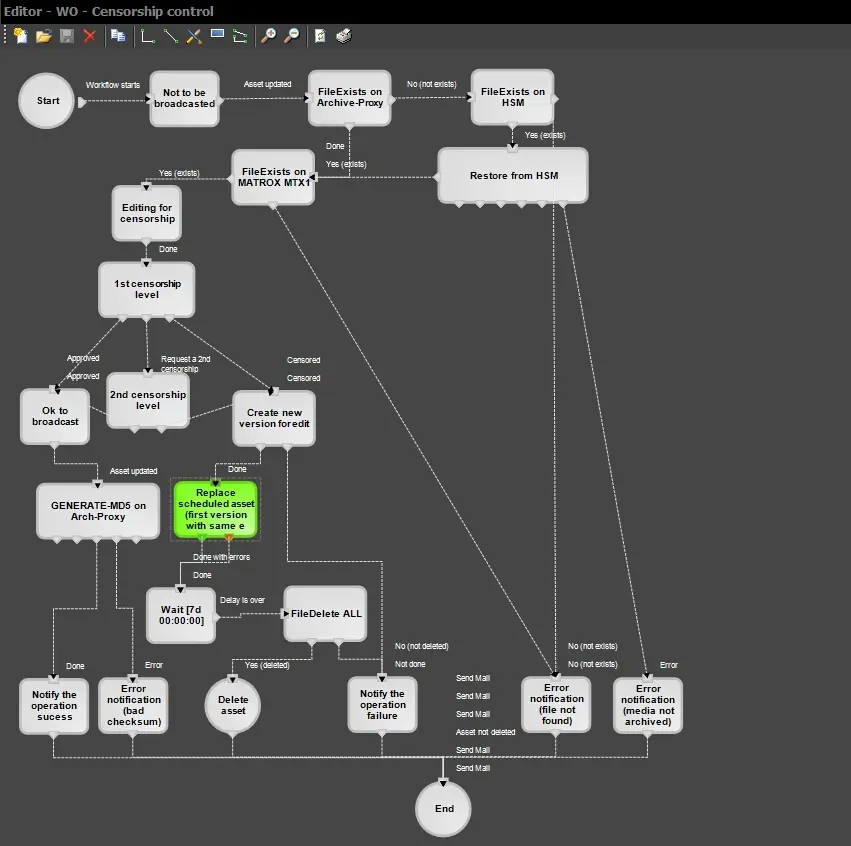
The "Replace scheduled event" actions can be included in T-workflow -under the T-Workflow designer- to, for example, automatically and quickly replace an asset with its new version (edited and approved after censorship):
 Replace_scheduled_event