59.2.39.2 Generating the Routing Table
The "Generate routing table" button populates the routing table (routerlinks001) in the database, inserting information into a main router or main and backup routers, depending on the configuration:
The system has only 1 router (MAIN). The routing table will contain the names given to the channels of the main router. Requisites for a correct generation are:
In "Etere Configuration > Settings > EE > On-air", the "main automation path" must be correctly set.
In the "Etere Configuration > Resources" section, one routing resource (video router or master control) must be assigned to automation.
NB: If the routing table is missing, an error message will be prompted at the main/clone automation startup.
The system has 2 routers (MAIN and BACKUP). The routing table will contain the names of the channels of the main and backup routers and the links between them (at least one link must be set). Requisites for a correct generation are:
In "Etere Configuration > Settings > EE > On-air", the "main automation path" and "backup automation path" must be correctly set.
In "Etere Configuration > Resources", one routing resource (video router or master control) must be assigned to automation and another one to the automation clone.
NB: If the "backup automation path" is wrongly set (i.e. compiled when only one automation is used), the routing table would not be generated.
Note
Every time a video router or master control is added to a virtual router, it's required to generate the routing table to update switches.
How to generate the routing table
Follow the procedures described below to generate the routing table:
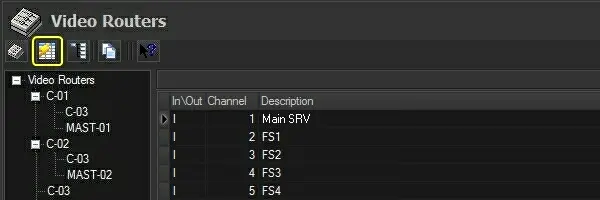
1. Go to Etere's "Configuration > Settings > Devices > Video Routers" and press the [ Create table] button to generate the routing table:
Create_table
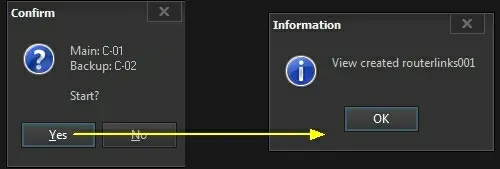
2. A small window will indicate the main (and backup) routers for which the routing table will be generated and prompt the user to confirm the operation:
main_and_backup_routers
MAIN displayed the main router present in the configuration file (auremote.ini) stored in the "main automation path".
BACKUP - If the "backup automation path" is set, it displays the backup router present in the configuration file (auremote.ini) stored in that path.
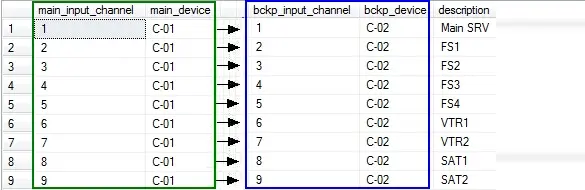
3.Press [Yes] to generate the routing table (routerslinks001) for the main router (e.g. C-01) and backup router (e.g. C-02):
outing_table_for_the_main_router
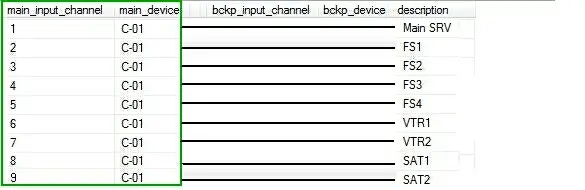
Please note that no links would be performed if generating the routing table for only one router (e.g. C-01).
outing_table_for_only_one_router
4. Each time a switch is performed on the main router, it is also performed in the backup router.
 Create_table
 main_and_backup_routers
 routing_table_for_the_main_router
 outing_table_for_only_one_router