85.2.18.1 Configuration
This plugin required configuring the following parameters:
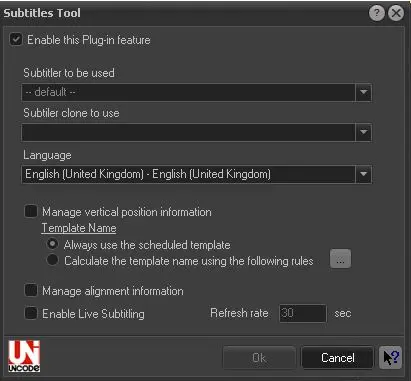
Subtitles Tool
Enable this plug-in feature - Tick this option to enable the subtitling feature of Etere STMan.
Subtitler to be used - Indicate the Main graphic device (e.g. subtitler) to which Etere STMan will send the subtitles for being transmitted.
NB: For information on how to add subtitlers refer to the Resources configuration chapter.
Subtitler clone to use - Indicate the backup subtitler device to be used when the Main subtitler is not available.
Language - Indicate the language of the subtitles to be transmitted along with the main video. It's worth mentioning that subtitles stored in the database are cached by Etere STMan as .sami files within the Etere's local application data folder (e.g. c:\users\myuser\appdata\local\etere\stman.cache.ctm\user.xxx\).
NB: For information on how to configure languages refer to the Language configuration chapter.
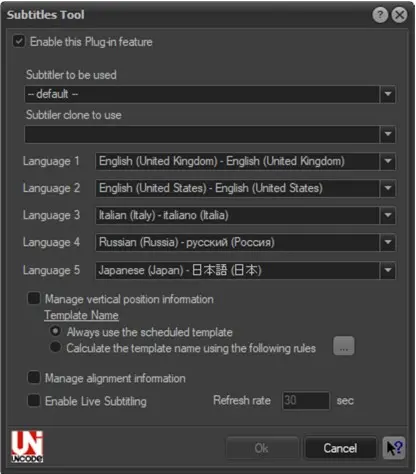
It is possible to manage up to five different languages at the same time, but it needs the license ET0097 to be purchased. This has been implemented in order to send multiple languages subtitles with a DVB stream.
multiple_languages
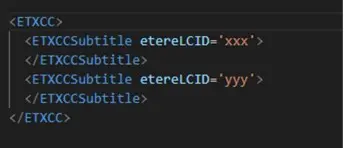
In this case, when different languages will be sent to CCInserter with same timecode, each subtitle will have its related LCID identifier.
LCID
NB: For information on how to manage multiple languages refer to the Etere CCInserter chapter.
Manage vertical position information - If enabled, Etere STMan will use the vertical position information embedded within the subtitle file, you can select to:
•Always use the scheduled template, or
•Calculate the template name using the following rules (see the Rules (sbt_rules.xml)).
NB: This feature is not supported for MTX Logo devices.
Manage alignment information - If enabled, Etere STMan would attempt to align the subtitles text to center position by inserting spaces to the subtitles lines; If disabled, subtitles text will be always displayed left-aligned.
NB: Subtitles font is not managed by STMan, please refer to Subtitles Management in MAM if you need to change the fonts and size in subtitles.
Enable Live Subtitling - In the event when there are changes/updates to the subtitle file, by enabling this option, STMan would reload the subtitle file after the time interval (in seconds) specified in the parameter. By default, this option is disabled.
Refresh rate - Indicate the refresh rate (in seconds) to update the subtitles transmission.
If STMan failed to establish connection to Automation for more than 30 seconds, the subtitles file associated to the scheduled event would not be transmitted. As a result, the scheduled event would go on-air without subtitles.
When problem occurred in STMan during on-air event, if the Global settings “When STMan starts, commands will be executed > At the middle of the onair event” is enabled, you can restart STMan in the middle of an event if necessarily. After 15 seconds upon restart, STMan would able to sync and presence the subtitles for current event.
NB: The “Subtitles Tool” feature is visible only if License EA1230 (Etere Subtitles Tool) is present.
 Subtitles_Tool
 multiple_languages
 LCID
LCID