87.1.5.1 What is Racks?
What is Racks?
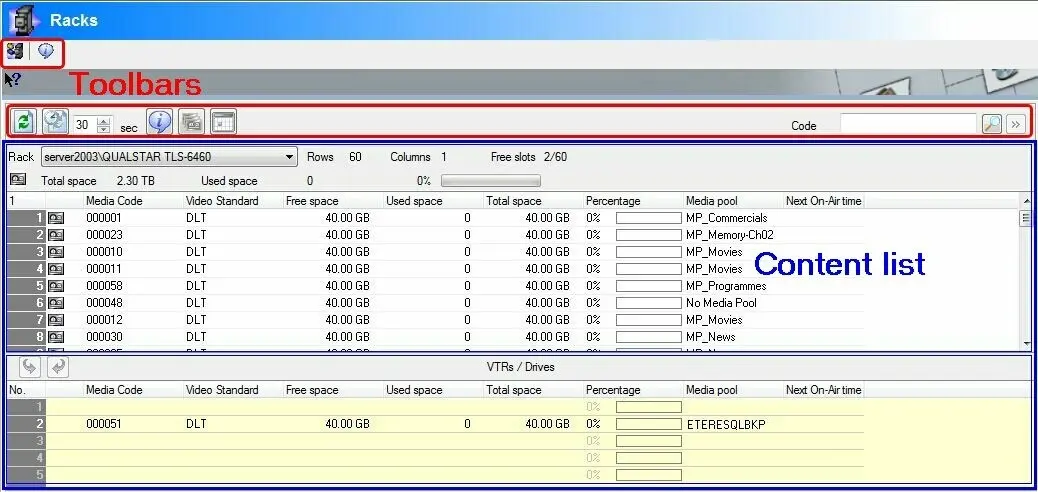
The "Racks" module (available from Etere Configuration and Etere MAM) allows operators to view and also manage the tapes/cartridges present in the Libraries and Racks configured in the Etere system, providing useful information such as their free space, used space, description and much more.
Librarystatus01
As shown in the figure above, the user interface is mainly composed by the Content List (i.e. where contents of each single Rack/Library can be consulted) and a Toolbar (holding the functions supported for their management).
Content list
The Content list allows operators selecting a specific Rack/Library and consulting all its related information including:
Function - Rack
Description : Select here the Rack/Library to be consulted. Libraries and racks available on this section are created either automatically and manually:
•automatically: each time an HSM library is added under the Resources Editor module or a Cart Machine is created in the Legacy Resources module.
•manually: each time a Rack is created through the Container Management form.
Function - Properties
Description : Once selected, it will be indicated the number of rows and columns that determines the slots present in the Rack/Library as well as the exact number of free ones.
Moreover, it will be also displayed the total and used space available on the Rack/Library.
Function - Tape details
Description : The proper content list will display all the tapes/cartridges associated to the selected Rack/Library. For each tape/cartridge it will be detailed the following information:
•Media code: The barcode assigned to the tape/cartridge.
•Video standard: the standard of video (e.g.: PAL, NTSC, etc) used for the tape/cartridge.
•Free/Used/Total space: The amount of free, used and total space on the tape/cartridge.
•Media pool: The media pool the tape/cartridge belongs to.
•Redundant tapes: Indicates if the tape/cartridge contains material already present in another one.
•Next on-air time: Indicates if the material present in the tape/cartridge is scheduled to go on-air.
Function - Tape info
Description : Opens the "tape info" tool, which provides a detailed list of all media contained on it.
Functions toolbar
The toolbar, position in the top part of this section provides operators with the following rack-related functions:
Function - Container Management
Description : Opens the "Container management" module which allows viewing, modifying and also creating new Racks.
Function - Library Summary
Description : Opens the "Library summary" form which details the operations (i.e.: 'archive, 'restore', etc) performed for ALL the Libraries/Racks.
NB: The functions listed above are available only from the Etere Configuration > Settings > Racks module.
Function - Refresh
Description : Updates the information displayed for the selected Rack/Library.
Function - Automatic updating
Description : Set here a custom refresh-interval (default=20 seconds) for updating the Rack/Library information.
Function - Library Summary
Description : Opens the "Library summary" form which details the operations (i.e.: 'archive, 'restore', etc) performed for the selected Rack/Library.
Function - View redundant tapes
Description : Adds to the library/cart content list the 'redundant' column which indicates if all files within the tape are stored in -at least- another different tape (all tapes will be checked).
NB: This option is active only for HSM libraries.
Function - View transmission date
Description : Adds the 'next on-air time' column to the Rack/Library content list.
Function - Code
Description : Searches and highlight a specific cartridge/tape matching (also partially) the entered code.
 Librarystatus01