73.3.3 Streaming
In the "Streaming" Configuration tab, fulfill the following parameters:
Memory_Streaming_Configuration
Enable -This checkbox needs to be enabled in order to start the configuration.
Select a format - 3 types of format are supported:
-Windows Media Streaming: Support http streaming, URL is localhost and used port number 8083 (http://localhost:8083). It does not require external software to start streaming. Streaming starts when encoding started.
For remote access, e.g. using VLC Media Player or Windows Media Player, is playable with URL http://PCName:8083 (input actual PC name in URL).
-UDP Streaming MPEG-2 MP3: Support UDP streaming, use default URL udp and port number 5000 (udp://localhost:5000). It does not require external software to start streaming. Streaming starts when encoding started.
For remote access, e.g. using VLC Media Player, is playable using URL "udp://@:5000".
You could also plan for streaming TTL ("Time to Live") data packet with UDP streaming before data is revalidated or discarded, by adding “?ttl=<value>” in UDP string , for example:
“udp://IP:port?ttl=value”, where the value is defined in seconds, e.g. 3600 (1 hour), 7200 (2 hours), 86400 (24 hours), etc.
When click on the "Advanced Settings" button at the lower panel, more format are available for selection. Please refer to "Advanced Settings" table listed below.
Bit rate - Bit rate available for selection are min. 500KB/sec, 1MB/sec, 2MB/sec, and max. 5MB/sec. More possible bit rate are available when click on the "Advanced Settings", as shown on the Advanced Settings table below.
Size - Available sizes for selection are: 400x240, 640x360, 854x480.
More video size selection are available when click on the "Advanced Settings", as shown on the Advanced Settings table below.
URL - write the correct URL to which the stream should be sent.
Manual commands
Start - allow to start the streaming over the conffigured URL, by default the streaming starts alongside the start of recording.
Stop - allow to manually stop the streaming it also enables the settings to be changed while the encoder is still recording (without disrupting the encoding process).
NB: Memory files are switched into OnFrame event to get the file length accurate to the frame to achieve frame-accuracy. To prevent missing frames in the file, Memory set the time for schedule next command by getting the time when the last command has been scheduled.
Advance Settings
File Format
-File format: following selections are available
•Auto Select
•RTMP Streaming
•UDP Streaming MPEG-2 MP3
•RTSP Streaming (beta)
•IIS Live Smooth Streaming
•RTMP (FMLE) Streaming – H.264
•RTMP (FMLE) Streaming – VP6
•Windows Media Streaming
-File extension: available file extension are
•Mpg
•Mpeg
Video Format
-Video format: following selections are available
•Default format codec
•MPEG-1 Video
•MPEG-2 Video
•Intel QuickSync H.264 Encoder
•MPEG-4 part 2 Video
•No Video
-Video Size: following selections are available
•400x240
•640x360
•854x480
•720x486
•720x576
•1280x720
•1920x1080
-Bit rate: following selections are available
•500KB/sec
•1MB/sec
•2MB/sec
•5MB/sec
•12MB/sec
•24MB/sec
•30MB/sec
•50MB/sec
Audio Format
-Audio format: following selections are available
•Default format codec
•MP2 (MPEG audio layer 2)
•MP3 Lame (MPEG audio layer 3)
•ATSC A/52A (AC-3)
•ATSC A/52A (AC-3) Fixed
•No Audio
-Sample rate (Hz): following selections are available
•44100
•48000
NB: The encoder allow generation and use of encoding with up to 8 audio tracks simultaneously.
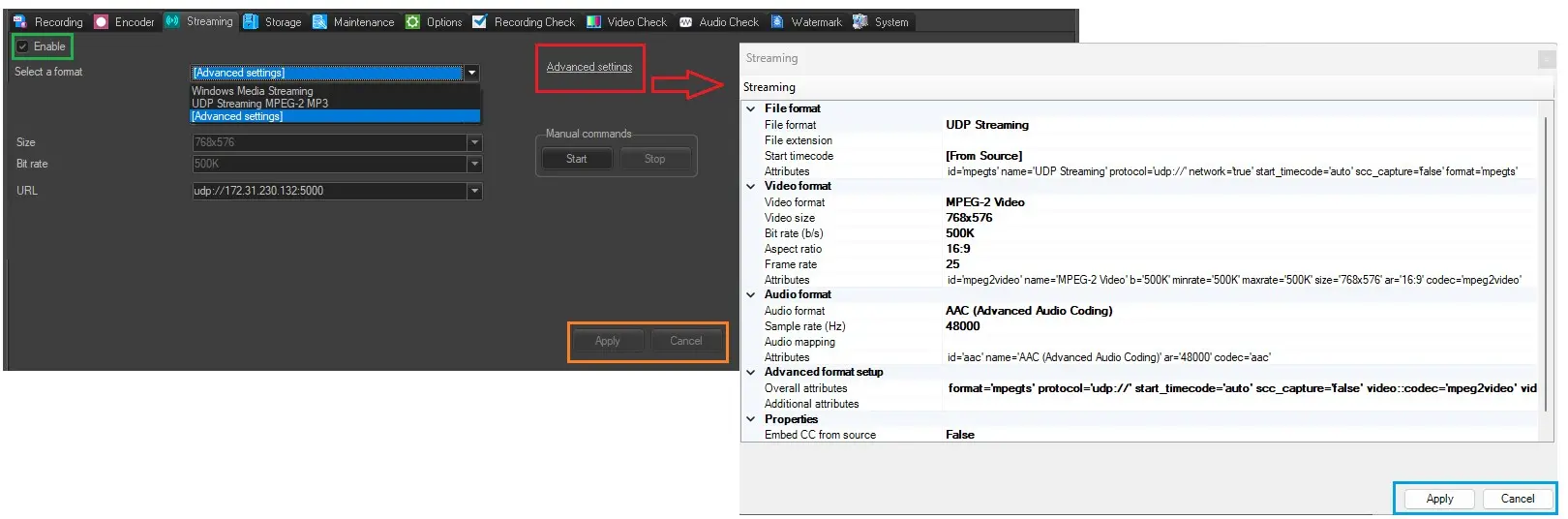 Memory_Streaming_Configuration