59.12.1 Searching contacts
Searching existing contacts
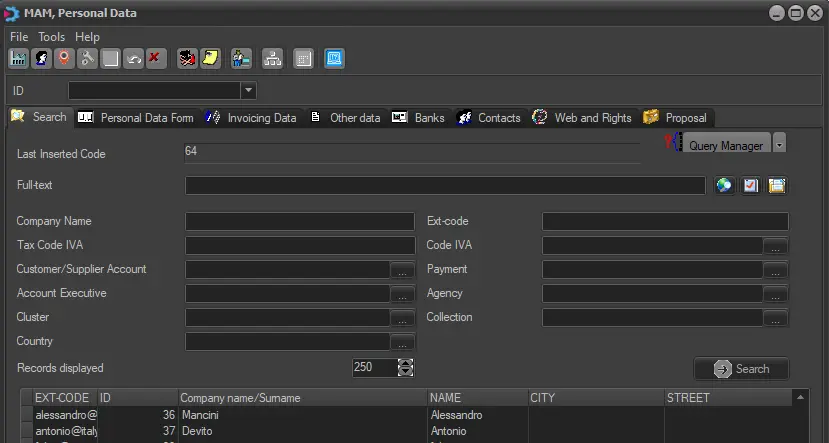
Use the "Search" tab each time you need to browse or edit existing personal data; this window allows you to search for existing companies or persons matching or containing the following filters:
Search
Last inserted code: Display the code of the previously opened contact.
Query manager: Search using the Etere Query Wizard utility, which allows using a custom SQL query to search personal data on the Etere database.
Full-text: If the Etere database has been indexed for full-text search, this section will allow you to search across all the personal data fields (i.e. code, name, agency, etc).
Moreover, use the [advanced full-text search] to include boolean operators in the search.
Company name / Surname: The company or person's name (or a part of the name).
Ext-code: The identification code (or a part of the code) assigned to the contact.
Tax Code GST/VAT: The TAX code of the contact.
Code GST/VAT: Specify the GST/VAT code containing the GST/VAT rate for calculating the GST/VAT.
Customer/Supplier account: Search by the customer or the supplier associated with the contact.
Payment: Search by the payment method associated with the contact.
Account Executive: The account executive contact's name (or a part of the name).
Agency: The agency contact's name (or a part of the name).
Cluster: The name (or a part of the name) of the cluster to which the contact is added.
Click on the browse button to open the client selection table. In the table, Air Sales and BMS are distinguished into different clusters, and you must be assigned appropriate rights to view the personal data in the respective cluster. Refer to Rights Management > Rights Types and Descriptions for rights assignment.
Collection: The name (or a part of the name) of the collection to which the contact belongs.
Country: The country set in the contact's card.
Once the [Search] button is pressed, all contacts matching the inserted parameters will be displayed in the bottom list, from which double-clicking on the related line will let you access their various data sections.
The displayed contacts contain data defined in Personal Data form, including TEL, Tax Code IVA, Account executive number, Agency, Cluster, Customer Description Product Code, etc.
NB: Compulsory fields that must be set to create a contact card can be defined by the administrator under the Etere Configuration > Settings > Basic > Personal Data section.
 Search