84.4.5.87 CUSTOM > XYZ
Import Scope
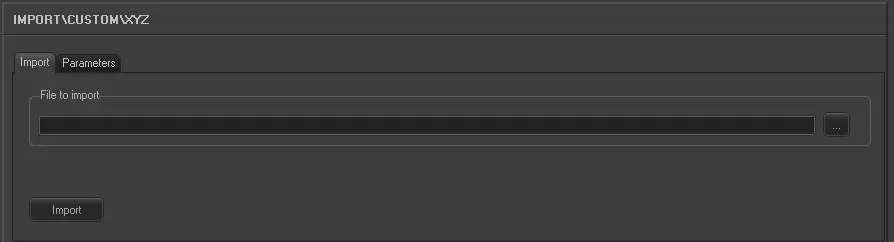
The XYZ Import allows you to import from an XYZ file. Specify the file you wish to import.
Import parameters
Import
Import_custom_xyz
•File to import: Specify the file to be imported.
Parameters
Import_custom_xyz_1
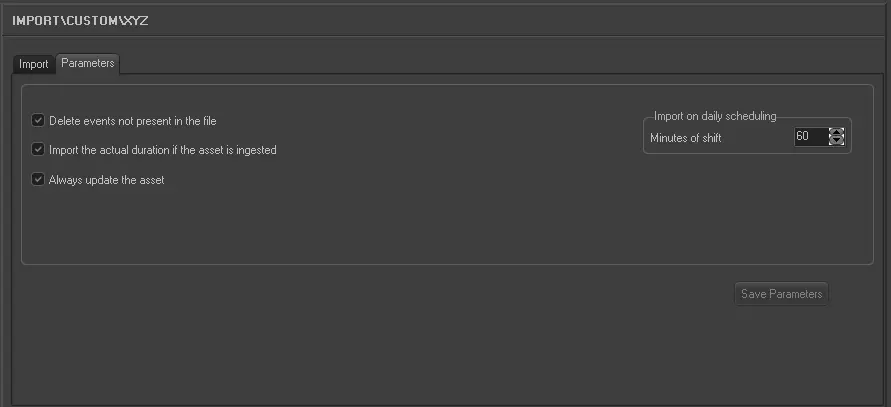
•Delete events not present in the file: Allows you to delete all events scheduled on the imported day but not present in the imported file.
•Import the real duration if the asset is ingested: Allows you to import the real duration of the asset form in a situation where it has been recorded, even if the scheduled duration is present and different in the imported file.
•Always update the Asset: Allows you to always update the asset forms even if they already exist in the Archive. Elements that will be updated are Duration, Mark in/Mark out, Type, Description and Insertion points. This parameter also refers to LIVE events.
•Import on daily scheduling: If you are importing the schedule for the current day, this parameter defines what time on the schedule the import starts from. It is calculated as Current time + Time shift. Events with a start time before the current time will not be imported.
Launch the import
Once the import has been configured, it can be started just by pressing the <Import> button, once the import has finished, it will be possible to display the schedule of the related day to verify and/or approve the import operation.
 5305_Import_custom_xyz
 5304_Import_custom_xyz_1