84.2.4.3 Auto Ingest
The Auto Ingest secondary event allows the event to which it is associated to be automatically ingested by the Etere Ingest's scheduled module. The following parameters are required:
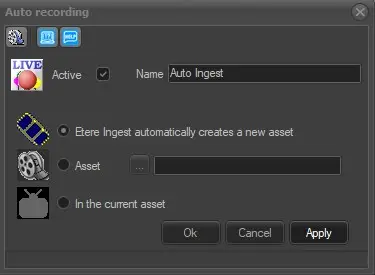
Auto_Recording
Active: Check this parameter to enable the secondary event, leave it unchecked to disable it.
Name: Enter a brief descriptive name.
Icon: Double-click on the default icon to change it with a more suitable one.
Etere Ingest automatically creates a new asset: If enabled, a new asset will be created to hold the content to be automatically ingested. The default title for ingested assets is "LIVE created by Scheduled ingest' and its type is the same as the scheduled event.
Asset: Select an existing asset to hold the content to be automatically ingested.
In the current asset: This option is enabled when a Live secondary event associated to the current asset is selected for auto ingest using the “Auto-recording: in the current asset” feature in Executive Editor.
Note: Please note that this secondary event is available only for LIVE events. If the primary event is not a LIVE, the event will not be visible in the secondary events form.
Media Library [F7]: Open the Media Library clicking on this button on the secondary event's toolbar. It allows to load the asset related to the primary event for which the secondary event is being defined. If there are unsaved changes, before opening Media Library a message will be prompted, asking to save or not the modifications to the secondary event.
 Auto_Recording