59.4.3.2 Process Settings
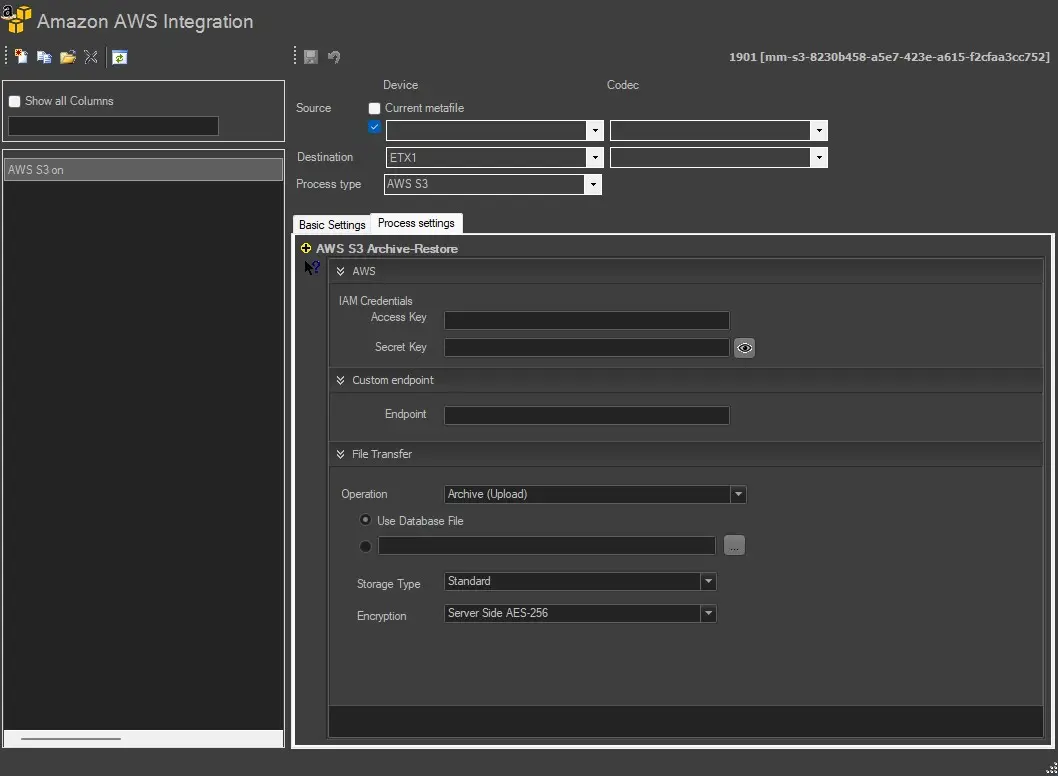
Define the Process Settings as indicated below.
Process Settings.
AWS – IAM Credentials
Access Key - Enter the access key for the IAM account user
Secret Key - Enter the private key to authenticate the user access key.
The private key is encrypted during typing; you can decrypt the key by clicking on the icon.
Custom endpoint
for S3 compatible services, set here the custom endpoint (in this case, leave the "region" setting blank in the resource-related)
Transfer File
Operation - Select one of the available operations, e.g. Archive (Upload), Retrieve (Download), or Delete.
Upon selecting the operation, indicate how the file should be used:
• Use Database File: If enabled, the full path to the file in the Database would be retrieved (a reference to the Source device and codec indicated for the action)
• Custom File: If enabled, use the browse button to locate the file in the local or network path.
Storage Type - Select one of the storage types to operate. The options are:
• Standard
• Standard - Infrequent Access
• Reduced Redundancy
Encryption - Determine the encryption type to be used during file transfer. Or select "None" to transfer the file without encryption.
 process_settings