72.2.2.47 Annotations - Creating Proxies via Workflow
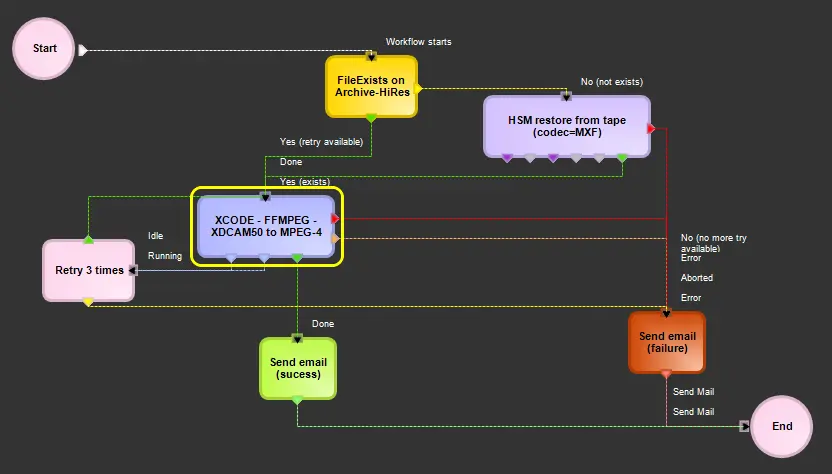
Etere's T-workflow technology allows easily creating proxy files in the most common formats including WMV, MP4 H.264 and MOV H.264; a user-friendly "T-Workflow Editor" allows creating proxies just that easy as dropping all required transcoding actions including:
T-Workflow Editor
(example: generate a MP4 proxy from a XDCAM50 hires file, restoring it from the library if required)
Etere Transcoder
RZCP Transcoder
Flexy Converter
Batch Transcoder
H.264 .MP4
In order to keep the original frame rate when creating H.264 .MP4 files with RZCP Transcoder (and thus allow players to display the original frame rate), the chosen preset (e.g. "System > H.264 Exporter") must be configured as progressive (i.e. non-interlaced) to encode the proxy by deinterlacing the source video and combining two fields into single frames. See a configuration example below:
H.264 .MP4
Proxy for web
Since EtereWeb's Silverlight Player is unable to play full resolution files (e.g. 1980x1280), proxy files created by Etere Transcoder must be encoded with a "Half" resolution profile.
 T-Workflow_Editor
 H.264_.MP4