87.1.3.9 Inventory
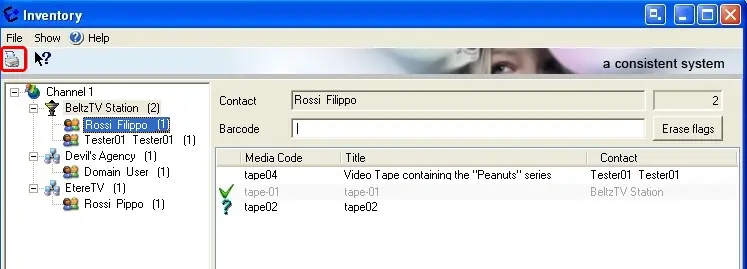
The inventory allows to view the current location of all loaned tapes, it will be indicated the unit and the contact who borrowed the tape:
Inventory
Making click on a certain unit/contact, on the left-panel will be shown a list containing all its currently loaned tapes, this list can be modified (for printing purposes) as follows:
•Add tapes to report: Add more tapes to the report by entering the barcode of a not-listed tape, then press 'Enter',
•Remove tapes from report: Set a listed tape as returned (thus excluding it from the report) by inserting its barcode and pressing 'Enter',
•Erase flags: Remove all temporal flags previously added by pressing the 'erase flags' button,
In order to print the report it is enough to click on the printer icon, a document detailing the unit, contact and loaned tapes will be thus generated.
NB: Flags defined under this section are merely indicative and they will be lost when clicking on another unit/contact or when the Inventory window is closed.
 Inventory