59.4.7.6 For Grass Valley Profile Devices
To copy media files between two Grass Valley Profile Video Servers, you must use the executable provided by Etere. Copies carried out with the XfrExec executable support streaming during the copy process (stream copy) means that you can partially view video files while the copy is being performed.
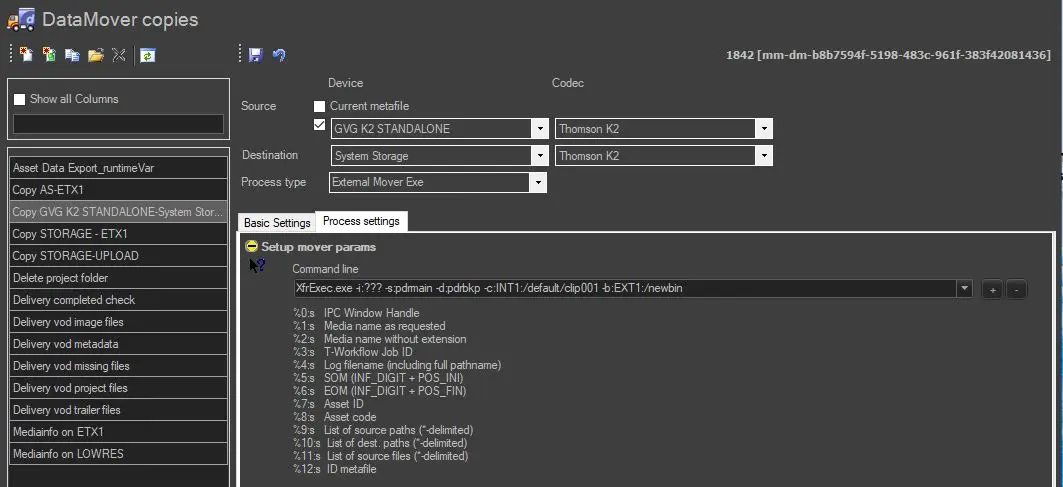
Process_Settings
To create this action, you need to set the External Mover Exe action as follows:
• Source, Destination, Codec & Basic Settings: Must be compiled as explained in Creating a new action.
• Command line: Use the Grass Valley Profile executable file (XfrExec.exe) for executing the moving process; you must also set its parameters as follows (the parameters with * must be specified by the operator):
XfrExec.exe -i:ipc -s:sourceProfile -d:destinationProfile -c:sourceClipName -b:destinationPath -n:destinationClipName -o:UML-options -p:UML-options
Supported parameters
-i* - Adds ipc (InterProcess Communication) capabilities such as 'abort' and 'completion percentage' (e.g.: '%0:s').
-s* - Specifies the source profile (address or IP) to be used (e.g.: 'PDRmain').
-d* - Specifies the destination profile /address or IP) to be used (e.g.: 'PDRbackup').
-c* - Source video clip name that can be specified with or without its full path (e.g.: 'INT1:/default/testclip03').
-b* - If required, specify the destination path (e.g.: 'EXT1:/newbin').
-n* - If required, specify here the video clip name (e.g.: 'NewClipName').
-o* - Set the <options> related to the source's UML description (e.g.: '(250-500)'), see Grass Valley UML documentation for more info.
For instance, use the -o:(%5:s-%6:s) parameter to trim the file from the file SOM to EOM.
-p - Set the <options> related to the destination's UML description (e.g.: '(250-500)'),see Grass Valley UML documentation for more info.
 Process_Settings