57.1.2 Video
video_checks
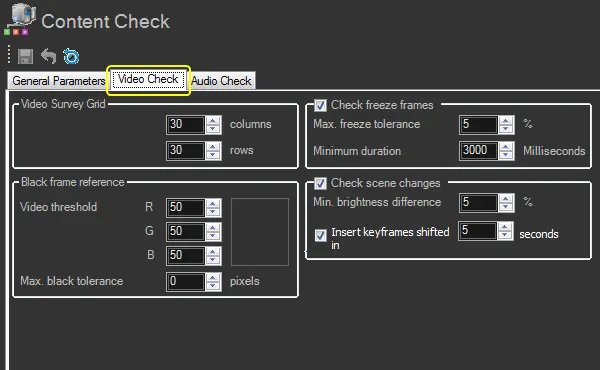
Video Survey Grid
Columns -Set the number of columns that will determine the width of the "screen area" to be analyzed for checking scene changes, freeze or black frames.
Please note that each column measures 1 pixel; therefore, setting this parameter to, for example, 30 means 30 pixels in width. 30 (default)
Rows - Set the number of rows (each column measures 1 pixel) to determine the height of the "screen area" to be analyzed for checking scene changes, freeze frames or black frames.
Please note that each row measures 1 pixel; therefore, setting this parameter to, for example, 30 means a 30 pixels height. 30 (default)
Black frame reference
Video threshold - Set the RGB channels to determine the reference luminance level for detecting black frames (e.g. in correspondence with audio silence).
Etere suggests changing this value only if "black frames" are not traceable using the default value.
50,50,50 (default)
Maximum black tolerance (pixels) - Set the dimension of the black reference level (in pixels) used for detecting black frames (e.g. in correspondence with audio silence).
This value is the minimum number of (black) pixels over the RGB threshold that must be considered black frames. 0 (default)
Freeze frames
Check freeze frames - If enabled, the content check process will check for "freeze frames" (i.e. video segment where a single frame is repeated) according to the parameter's value. enabled (default)
Maximum freeze tolerance (%) - Set the minimum "freeze" percentage difference between two consecutive keyframes considered a freeze frame. 5 (default)
Minimum duration - Set the minimum duration that video segments containing "freeze" frames must last to be marked as a freeze frame. 3000 (default)
Scene changes
Check scene changes - If enabled, the content check process will check contents for correct scene changes (i.e. consecutive frames with a high brightness difference) and mark them as "scene change" segments. enabled (default)
Minimum brightness difference - Set the minimum brightness percentage that must change between two keyframes to consider them a "scene change". 50 (default)
Insert keyframes shifted in - Enable this option to insert keyframes into the asset's EDL and define the interval (in seconds) for inserting keyframes and creating relative Picon. The default interval is 5 seconds.
Not inserting keyframes immediately (i.e. 0 seconds) is recommended since the generated thumbnails (i.e. Picons) would always be black.
 video_checks