59.4.20.7 Creating a project on Carbon Coder
The Etere's Flexy Converter is aimed to create a full Carbon Job XML exactly like the local Carbon Coder Application. In order to do this, the component requires a “template” project file (.pcp) and information about the files that you are going to transcode.
Project files (.pcp) can be easily created in Carbon Coder just by following the procedure below:
1. Open the local Carbon Application (e.g. ProMedia Carbon):
ProMedia_Carbon
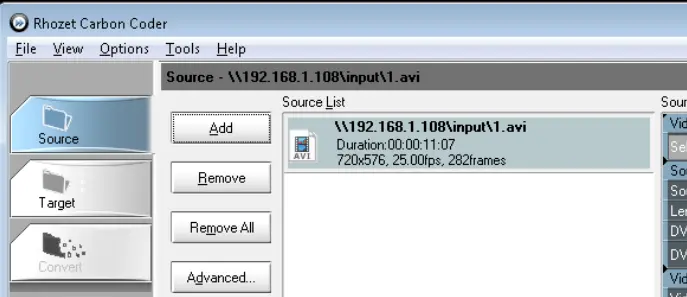
2. In the Source tab, add ANY source file supported by Carbon Coder (the source files doesn't matter as the “source part” of the .pcp file will be completely replaced by the Flexy Converter):
Source_tab
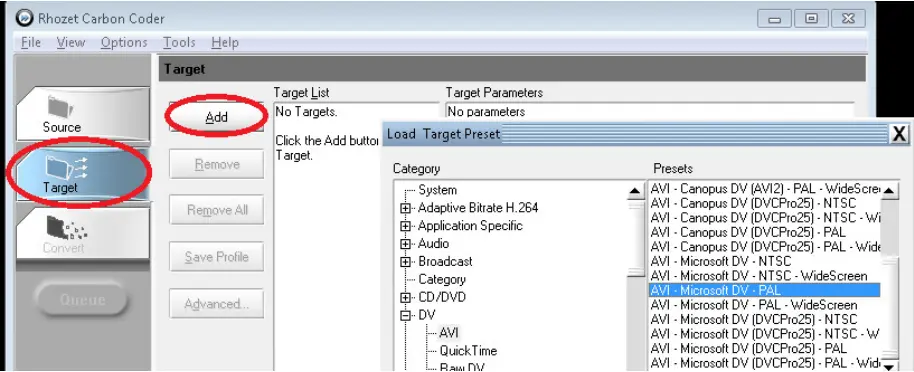
3. In the Target tab, add the Output(s) that you want to generate (this part will not be altered by Flexy Converter):
Target_tab
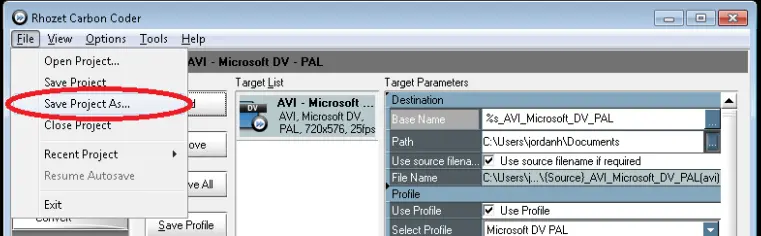
4. In the File menu, use the "Save Project as" function to create the .pcp file on some local/network place. For instance:
Save_Project_as
\\MyServer\Media\Projects\HiRes encoding - XDCAM50.PCP
NB: It's highly suggested to keep a naming convention for your .pcp files (e.g. "HiRes encoding - XDCAM50", "HiRes encoding - IMX50", etc.).
5. At this point the project is ready to be imported into Etere.
 ProMedia_Carbon
 Source_tab
 Target_tab
 Save_Project_as