85.2 STMan Features
Etere STMan manages secondary events associated with primary events scheduled in broadcasting playlists. In this chapter it will be provided information on how to configure and use the following features:
ALEPH Media - Enabled sending of secondary events via TCP/IP commands to the mobile platform.
BesTV - Send commands to an external application each time a BesTV event is transmitted.
Blackout service - Send information on transmitted events to a web server
Channel Branding - Manage all the graphics associated with scheduled events (e.g. idents, coming up, tiles, etc.)
Enabler Push Switch-In - Enable the insertion of events belonging to a subset of typologies.
Enabler Service - Enable the plug-in feature through STMan
HbbTV - Enable Etere STMan to send two HTTP queries to Main and Backup iMUX machines
Immediate Cmd Server - Receive immediate commands (to be sent along with the titler's) from clients stations
NDI Preload - Enable the preload NDI channel before the live event
Next Event Runtime - Check information on coming next events (including related secondary events)
OTT Restart System - Enable Mediaset Automation Systems to deliver AsRun Data to OTT Restart System
Parental Guidance - Enable to set the parental rating (PR) on event
Passthru commands - Send hexadecimal commands to devices.
SCTE Cue Tone - Enable SCTE 35\104 cue tone transmission for selected secondary events.
Secondary events - Send information about current/next scheduled events to a certain subtitler
Secondary video player - Overlay a video onto main events
Snipes Services - Trigger the execution of secondary events
Subtitles management - Manage subtitles associated with scheduled events
SyncroADV Service - Send information on commercial events immediately after their playback is started.
TitleBox Integration - Translate subtitle files to bitmap format to display subtitles
TV Guide - Announce the next events on the schedule
Vizrt Integration - Notify automation commands to the Vizrt Multichannel system to enable it to keep graphics aligned.
ULife AsRun Log - Send ULife As Run Logs to customer
NB: For each STMan feature triggered via Web Services, the communication protocol would be recorded in the log file, whether the connection to the destination URL is successful or unreachable. Both transmission protocols would be logged for those features that communicate with 2 destinations.
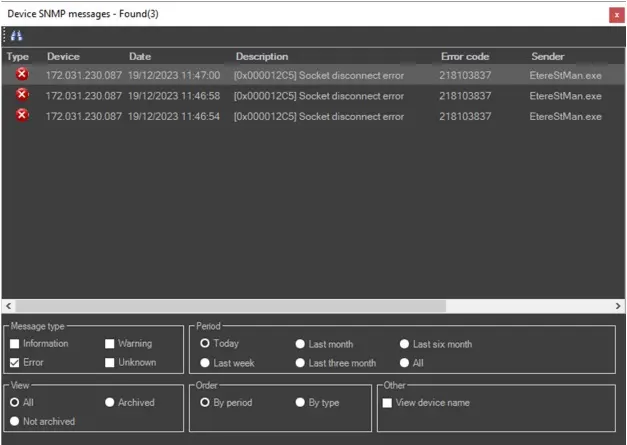
An SNMP message will be generated for each driver when a driver error occurs. The SNMP structure includes:
Error code: 218103837
Description: The driver error message
No additional settings are required in STMan.
How to schedule Secondary Events
Please refer to the "Secondary Events Management" section of the Etere Scheduling chapter for detailed information on associating and setting up secondary events with primary events scheduled in broadcast playlists.
 SNMP_STMAN