201.10.5.4 Change segment duration in the day
The "Change segments duration in the day" allows correcting the scheduled times and durations of the segments which made up a daily commercial playlist, and the live events scheduled in them. This tool is useful, for instance, tune-up playlists imported through the CH-9 > Exact time function, which imports not only events but also their related scheduling segments.
NB: Please note that each time this tool is opened, it automatically calculates the scheduled times and durations as imported through the CH-9 > Exact time function.
User interface
It display all segments presented in the current day as well as their key properties, fields highlighted in red can be modify:
Airsales_se_changesegmentsdurations
Segment - Name of the segment.
Actual time - Time the segment is scheduled to start.
First event - Displays the title and code of the event scheduled in the first position of the segment.
Part - Part number of the event, in case it has been exploded within the schedule.
ID - Univocal identification number of the segment within the system.
First event icons - It display the icons (e.g. lowres media, hires media, linked asset, booked space, etc) of the first event scheduled within the segment.
Occupation - Shows the actual duration of the segment, the total duration of events scheduled within it.
Duration - Shows the expected duration of the segment.
Scheduled time - Allows to modify the time the segment is expected to start.
NB: Scheduled times are automatically compiled during the CH-9 > Exact time import function.
Difference - If there's a difference between the actual time and the scheduled time of the segment, this difference will be displayed.
New duration - Allows to modify the current duration of the segment.
NB: "scheduled times" and "new durations" can be copied and pasted using the Ctrl+C & Ctrl+V combination keys.
Moreover, right-click on a segment and select the "Show events within the segment", it display all the events within the selected segment.
Saving changes
Once all changes have been performed, apply the changes by selecting the proper function (see list below) and pressing the [Save] button.
Update changed segments and related live events - Updates the "new duration" and "scheduled time" of changed segments, setting the duration of their contained live events equal to the segments durations.
Use this function to manually correct live events within specific segments.
Update only changed segments (not live events) - Updates the "new duration" and "scheduled time" of changed segments without altering the duration of their live events.
Use this function to manually correct specific segments.
Update changed segments and ALL live events - Updates the "new duration" and "scheduled time" of changed segments, setting the duration of ALL live events (present in the opened day) equal to the duration of their containing segments.
Use this function automatically correct the duration of all live events.
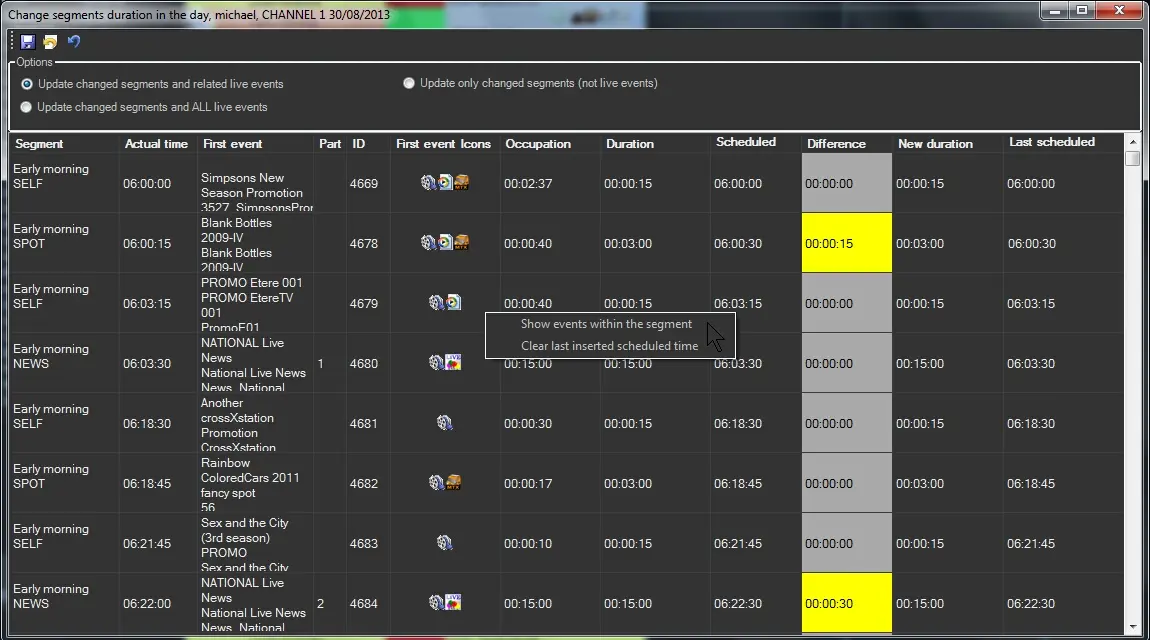 Airsales_se_changesegmentsdurations