201.10.3.1 Programs grid
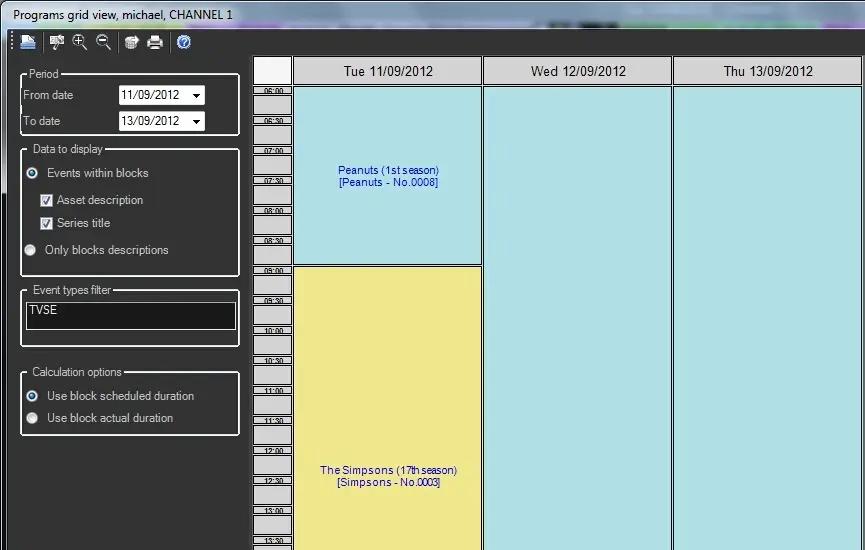
The "Programs Grid" tool provides a custom view on specific program types (e.g. TV Seasons) featured on a certain scheduling period, its filtering and visualization options include:
Multichannelgrid_pg_01
Parameter - Period
Description : Set the timeframe for scheduling data to be displayed.
Parameter - Data to display
Description : Indicate if you want to view blocks with the descriptions of either their contained events (assets and seasons titles) or the descriptions of structure blocks.
Parameter - Event types filter
Description : Specify the type of events to be taken into account for the visualization.
Parameter - Calculation options
Description : Select the duration to be displayed for each block, it can be either their scheduled duration (expected) or their actual duration.
Moreover, more functions are provided in the toolbar:
Function - Open
Description : Press this button to load the schedule visualization based on set parameters.
Function - Config
Description : Access a small form for changing the background colors to be alternately used for coloring blocks as well as the text color to be used for displaying blocks descriptions.
Function - Zoom in
Description : Use it to reduce the view of the grid.
Function - Zoom out
Description : Use it to enlarge the view of the grid.
Function - Export
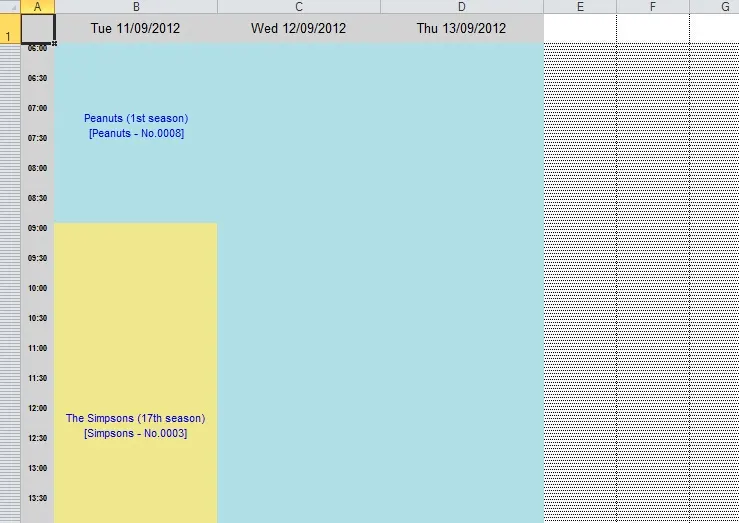
Description : Save the current open scheduling interval in EXCEL format (.xlsx). Data included in the exported file will be divided into scheduling days detailed with the following columns:
Multichannelgrid_pg_02
Weekday - Date (e.g. Tue 11/08/2012)
Block
Time - (06:00:00)
Description : (Peanuts 1st season)
Function - Reports
Description : Preview and print (in a single page) the scheduling opened in the grid.
 Multichannelgrid_pg_02
 Multichannelgrid_pg_01