59.4.7.3 For Any Executable
Creating an action that launches an executable (e.g., an integrated virus scanner) during a T-workflow is enough to create a new Data Mover action, as detailed in this chapter.
integrated_virus_scanner
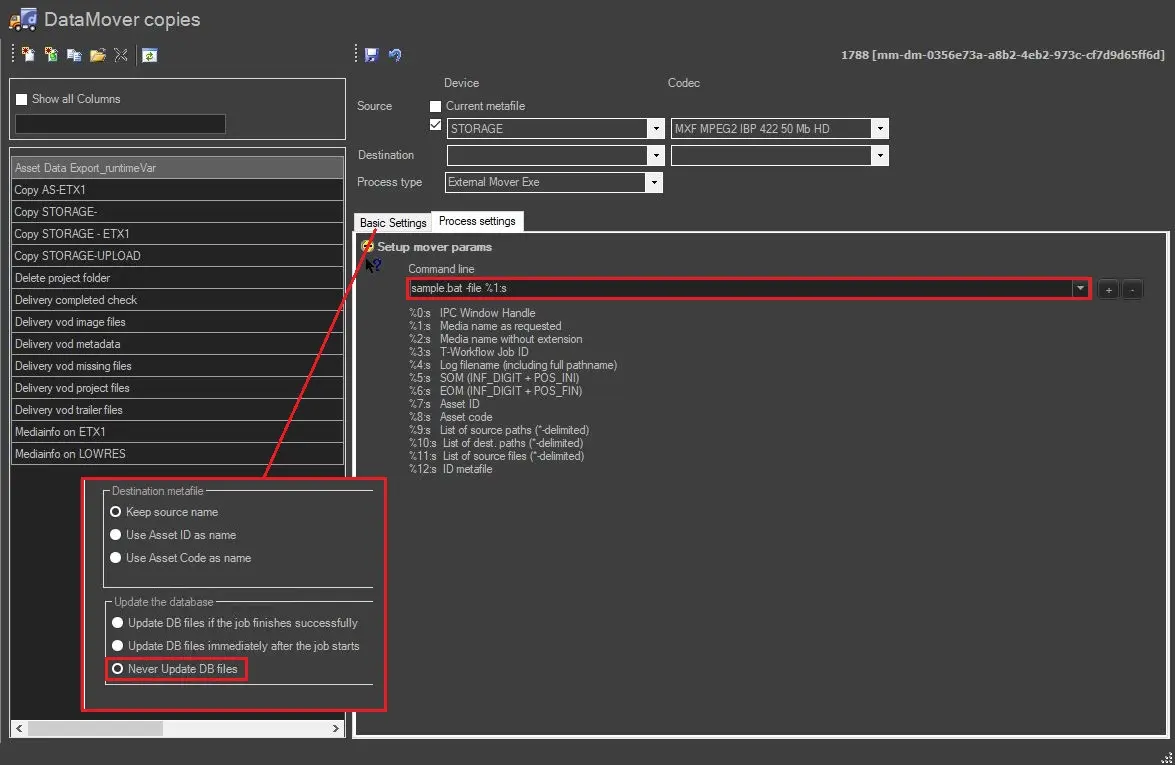
To create this action, you need to set the External Mover Exe action as follows:
• Source: Select the metadevice where the video file is stored; there is no need to set a destination.
• Command line: Enter the executable filename (e.g.: sample.bat) including any relevant parameters (e.g.: -file) and its values:
sample.bat -file %1:s
Etere Data Mover will launch the command line and return the outgoing code in the T-workflow log.
Required Files
To execute this action, the executable used here must be present within the Etere installation folder (e.g. C:/Program Files/Etere/) on the workstation that is intended to act.
 integrated_virus_scanner